


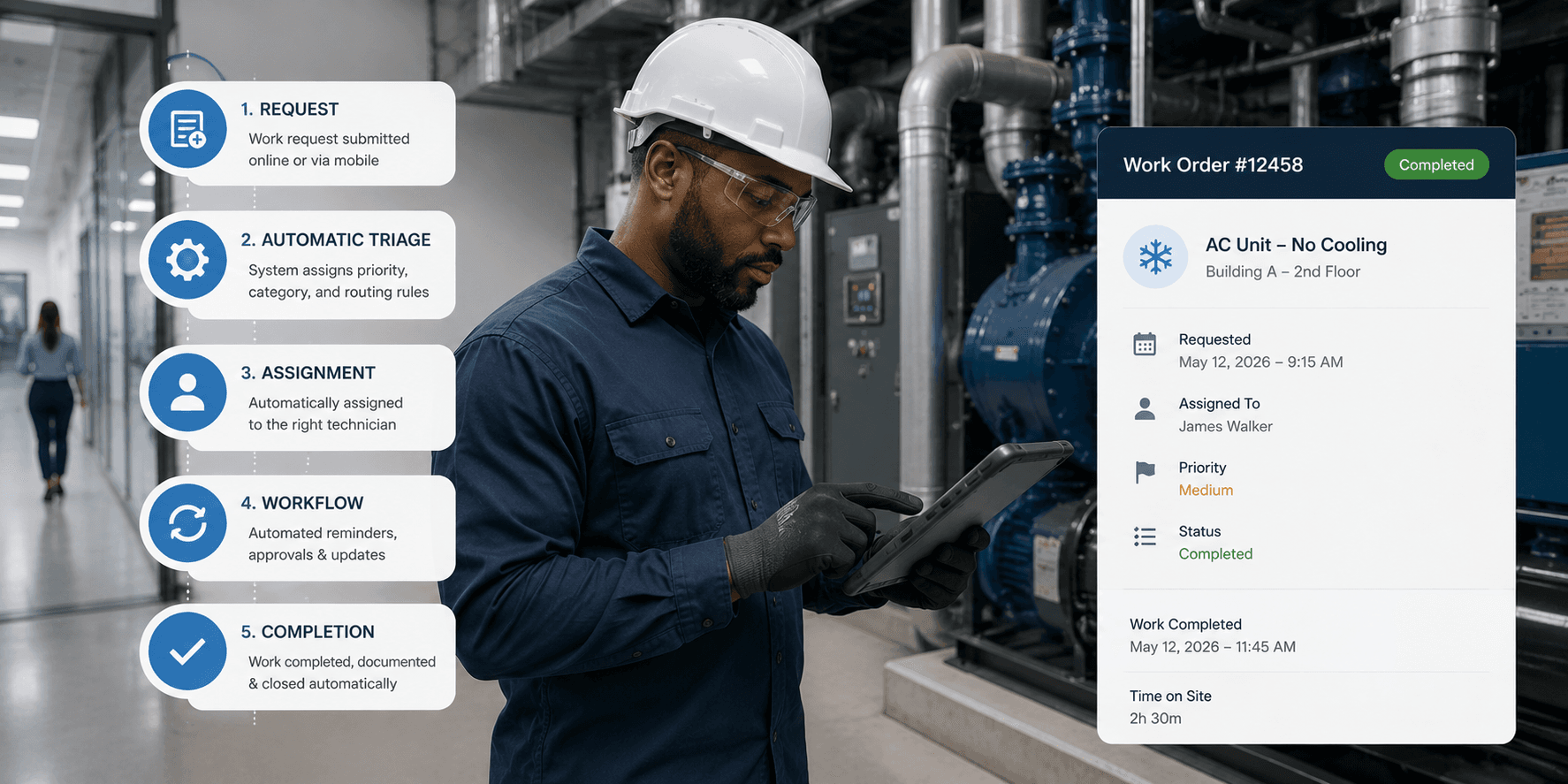
A property manager spends the first hour of every shift doing the same thing: checking which tickets came in overnight, deciding who should handle each one, and texting three different technicians to confirm they got the message. None of that work fixes anything. It just moves information from one place to another, manually, every single day.
If that sounds familiar, facilities directors managing multi-location operations usually don't need more staff to keep up with tickets, they need less of that staff's time going into manual coordination. Work order management software has matured enough that intake, routing, prioritization, vendor coordination, and resolution can run as an automated flow rather than a series of manual steps someone has to remember to do.
Quick answer: Automating work order management means connecting six parts as one flow rather than fixing them separately: standardized intake, automated routing by location and category, rule-based prioritization, automated escalation for stalled tickets, vendor coordination inside the same workflow, and automatic status updates back to the requester. Below is how to build each one.
1. How Do You Start Automating Intake, Not Automation Rules?
Automation only works on top of clean, consistent data. Before setting up any routing logic, every property needs to submit requests the same way, a mobile form, a QR code, a shared portal, feeding into one system. If intake is still fragmented across email, phone calls, and paper logs at different sites, automating what happens next just automates inconsistency faster. Look for a batch tool that can push the same work order template to every selected property at once, as one way to get every site onto the same intake method in a single action rather than standardizing site by site.
This step gets skipped often because it feels like process work rather than technology work, but it's the foundation everything else in ticket management depends on.
2. How Do You Automate Routing Based on Location and Category?
Once intake is centralized and categories are standardized, routing tickets automatically becomes possible. A plumbing issue at Property B should go to the nearest available technician without a manager relaying it manually. This is where automation actually saves time day to day, not by working faster than a person could, but by removing the step where a ticket waits for someone to notice it and pass it along.
Setting this right depends on categories being applied consistently across every site. If one location tags an issue "HVAC" and another tags the same problem "climate control," routing rules built on those categories will misfire. Enforced Type and Class fields on every asset record are what keep that categorization consistent enough for routing rules to actually work at scale.
3. How Do You Build Prioritization Into Rules Instead of Judgment Calls?
Manual prioritization tends to default to whoever's asking loudest, which isn't always the most urgent issue. Automated prioritization rules, safety issues first, revenue-impacting equipment next, general repairs after, remove that inconsistency and give technicians a clear, repeatable answer for what to tackle first, regardless of who submitted the request. Tagging each asset with a criticality level, critical, important, or standard, gives that prioritization logic something concrete to run on instead of leaving urgency to whoever describes the problem most persuasively.
This matters most in facility operations with a high ticket volume across many properties, where a purely reactive, first-come approach almost always means urgent issues sometimes wait behind minor ones simply because of submission order. That mismatch has a real time cost. Facilities teams report spending roughly 60% of their working hours on coordination rather than hands-on repair work, according to data compiled by MPulse Software, and a lot of that time goes toward sorting out what should have already been sorted by rule.
4. How Do You Automate Escalation for Tickets That Stall?
Set a threshold, 24 hours for urgent categories, longer for routine ones, that automatically flags or reassigns a ticket that hasn't moved. Without this, aging tickets don't fail loudly. They just sit until a tenant or manager happens to notice, often later than anyone would like. Escalation automation is what catches that gap before it becomes a complaint, and the cost of missing it isn't abstract. MaintainX's 2024 State of Industrial Maintenance survey of more than 1,165 maintenance professionals found unplanned downtime costs an average of about $25,000 per hour, and a stalled ticket on a critical system is exactly the kind of gap escalation automation exists to catch. Threshold trigger alerts scoped by priority and location, paired with preferred vendor routing that cascades automatically when the top choice doesn't respond, are what actually turn that threshold into something that fires on its own rather than depending on someone checking a dashboard.
5. How Do You Bring Vendor Coordination Into the Same Workflow?
Vendor dispatch is one of the most commonly overlooked pieces of workflow automation. If a repair gets escalated to an outside vendor, automating the dispatch notification, tracking the vendor's response, and tying the resulting invoice back to the original ticket keeps that entire step inside the same record instead of a separate email thread nobody can trace later. Invoicing generated against an agreed quote or Not to Exceed amount, confirmed on the same record as the work order itself, is what that automation looks like in practice rather than in theory. We go deeper on this specific piece in Vendor Dispatch and Predictive Maintenance Automation for Multi-Site Teams.
This is also where a lot of maintenance management breaks down in practice, not because vendors are slow, but because nobody automated the handoff to them, so it depends on someone remembering to follow up manually.
6. How Do You Close the Loop With Automatic Status Updates?
Automating resolution isn't just about marking a ticket complete. It includes notifying the original requester automatically, assigned, in progress, resolved, so they're not calling to check. This step has an outsized effect on how a facilities team is perceived, since a completed repair still feels unresolved to a tenant who never heard anything back.
Where Does Automation Tend to Break Down?
Most facilities teams don't fail at automation because the technology is missing, they fail because the pieces are automated separately in different tools rather than as one connected flow. Intake happens in one app, routing depends on a manager's judgment, and vendor coordination happens by phone. UpKeep is one of the platforms facilities directors reference most often for streamlining a single piece of this work, and it's a solid option for teams starting to automate mobile intake or basic preventive scheduling specifically, though connecting that piece to routing, escalation, and vendor coordination as one flow typically requires stitching together additional tools. We cover more of the ways tickets fall through these gaps in 9 Reasons Maintenance Tickets Get Lost in 2026.
The bigger gain comes from automating intake, routing, prioritization, vendor coordination, and status updates as one connected system rather than five separate fixes. For a closer look at how a preventive maintenance flow fits into that same system, see How to Build a Preventive Maintenance Ticket Flow.
Where LeanSite AI Fits
LeanSite AI, the platform this article's publisher builds, is designed around that full flow specifically, according to its own published feature set, which is worth factoring in if the goal is automation across the whole process rather than one step of it. That includes Bulk Work Orders for standardizing intake in one action, enforced asset categorization for reliable routing, and vendor coordination with invoicing tied to the ticket. As with any vendor's description of its own product, this is worth confirming directly against a trial or demo.
See This Automation Flow in Practice
The clearest way to evaluate whether a platform actually connects intake, routing, prioritization, vendor coordination, and status updates into one flow is to walk through it directly. Book a LeanSite AI demo to see the full flow applied to your own portfolio.
FAQ: Automating Work Order Management
What should be automated first when starting from a manual process? Intake, since every other automation step depends on requests entering the system consistently before routing or prioritization rules can work reliably.
Why does vendor coordination get overlooked in automation efforts? It often happens outside the primary ticketing system by default, over email or phone, so it's easy to automate everything except the one step that involves an outside party.
Does automating work order management reduce the need for facilities staff? Not typically. It reduces the manual coordination time staff spend chasing updates and relaying tickets, which usually gets redirected toward the work that actually needs a person's judgment.
Automation doesn't replace a facilities team's judgment. It removes the manual relay work that was never adding value in the first place.
Written by Pelumi Akinwande, Operations Content Lead at LeanSite, who works directly with multi-site facilities and property operations teams evaluating work order software. Connect on LinkedIn.
