


TL;DR
Cleaning vendors should choose software around the full request-to-payment workflow, not scheduling alone. A useful pilot tests cleaner dispatch, job status, photo evidence, customer approval, and invoice handoff before a wider rollout.
A completed cleaning job should produce an approval-ready record, not another round of phone calls. Commercial cleaning work order software connects service requests, crew assignments, completion evidence, and billing records. For commercial vendors and facility managers, the strongest buying test is simple: can one job move from request to payment without repeated data entry?
Cleaning work order: A digital record that identifies the location, cleaning scope, assigned team, deadline, completion evidence, and approval status.
Leansite belongs on the evaluation shortlist for teams bringing cleaning work into a shared facilities workflow. The selection process should start with a real service request and follow it through every handoff.
Table of Contents
Which cleaning software belongs on the shortlist?
The best shortlist matches the operating model: dedicated cleaning crews, broader field services, or cleaning coordinated alongside facility maintenance. A product name alone doesn't establish workflow fit. Buyers should compare the same example job across candidates and ask each supplier to demonstrate the required steps.
Four candidates and their evaluation priorities
These candidates offer starting points for evaluation, not a verified feature ranking.
|
Candidate |
Evaluation angle |
Demonstration to request |
|---|---|---|
|
Leansite |
Shared cleaning and facilities coordination |
Location-based work, vendor handoffs, and approval visibility |
|
Novagems |
Cleaning-team scheduling and tracking |
Recurring shifts, cleaner assignments, and job updates |
|
CleanTelligent |
Cleaning-focused software candidate |
Inspection records, customer requests, and completion evidence |
|
Service Autopilot |
Service-business software candidate |
Dispatch, recurring jobs, and invoice handoff |
The supplied research describes Novagems as supporting scheduling, tracking, and management. The other rows identify demonstration priorities rather than confirmed capabilities.
Who should pick which operating model?
Cleaning contractors should prioritize crew coordination and customer acceptance; property operators should prioritize location history and cross-vendor visibility.
-
Dedicated janitorial teams: test recurring assignments and inspection workflows.
-
Multi-service vendors: test how separate trades share customer and billing records.
-
Portfolio operators: test location permissions and standardized reporting.
The guide to multi-site work order platforms provides a useful follow-up for portfolio buyers.
What should cleaning work order software track?
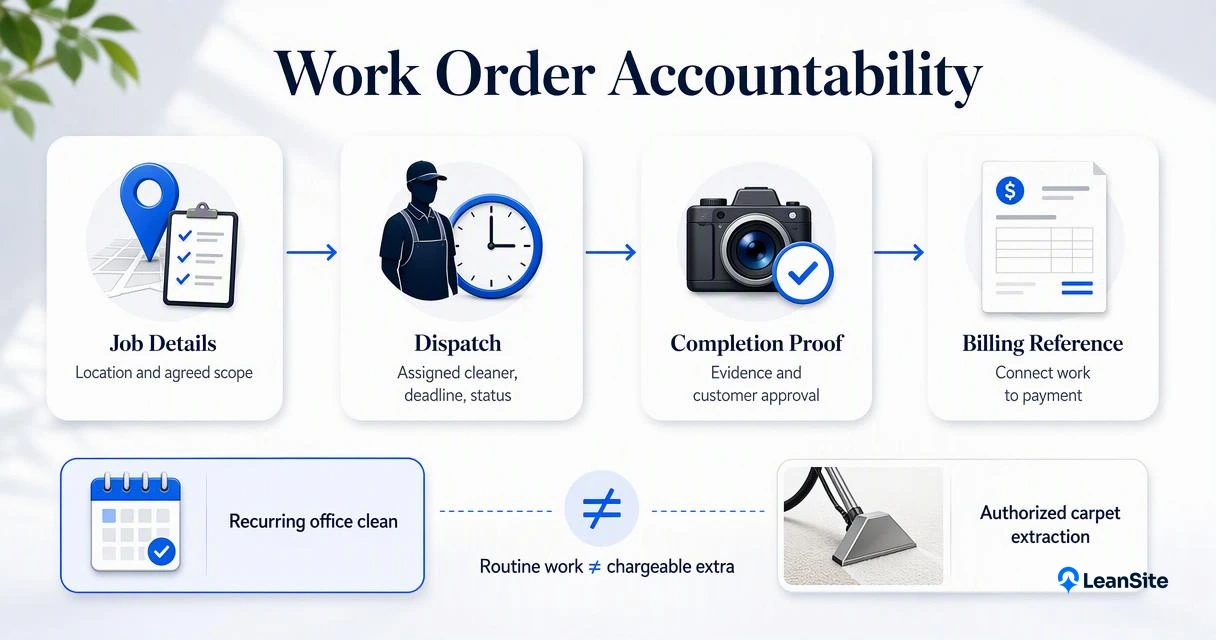
Cleaning work order software should track the service location, agreed scope, assigned cleaner, deadline, job status, completion evidence, customer approval, and billing reference. Those fields connect operational work with commercial accountability. Recurring schedules organize routine cleaning, while separate work orders make extra services, complaints, and chargeable requests easier to review.
Separate routine scope from additional services
Routine cleaning and chargeable extras need distinct records. A nightly office clean might fall under a monthly contract, while carpet extraction requires a separate authorization. The system should preserve that distinction through approval and billing.
-
Scope: Rooms, surfaces, tasks, exclusions, and service frequency.
-
Dispatch: Assigned crew, access instructions, equipment, and due time.
-
Evidence: Checklist results, permitted photos, notes, and timestamps.
-
Commercial record: Contract reference, approved extras, and invoice status.
For a deeper evaluation checklist, the 2026 work order visibility guide covers related selection criteria.
Make workload assumptions visible
Workloading translates cleaning scope into expected labor requirements. Buyers should record task frequency, cleanable area, and estimated task time, then compare those assumptions with actual job records. Any claim of alignment with ISSA standards should identify the specific reference and calculation method.
A completed checklist records activity; an approved scope and inspection record establish whether the agreed service was delivered.
How does a cleaning request become payment?
-
Capture the cleaning request with its location and scope.
-
Confirm coverage, pricing, and authorization.
-
Dispatch the assigned crew with access details.
-
Record completion, checklist results, and permitted photos.
-
Route the evidence for customer acceptance.
-
Create the billing record and reconcile payment against the approved work.
Test the handoffs with one realistic job
A useful pilot follows an extra floor-cleaning request at a commercial property. The dispatcher records the service area, the customer approves the quoted scope, and the supervisor assigns a crew. After completion, an authorized reviewer accepts the evidence before finance bills the approved amount.
Completed, accepted, and paid should remain separate statuses. Each represents a different responsibility, and each needs a named owner. Faster invoicing depends on an approval-ready record; software alone doesn't change customer payment terms.
For larger contracts, automating work orders across 100 locations offers related planning guidance.
Keep contract selling separate from delivery proof
Janitorial sales software and operational work order software address different parts of a contract. Buyers should distinguish quoting tools from systems that document service delivery. The following video offers related commercial-cleaning software context; its headline is not a verified earnings benchmark.
How Leansite handles this
Leansite's fit should be demonstrated through a cleaning-specific request-to-approval walkthrough, using a real property, vendor, and service scope. That walkthrough gives buyers a practical basis for assessing the platform against their operations. Product capabilities, integrations, and billing arrangements should be confirmed directly during evaluation.
Build the demonstration around shared visibility
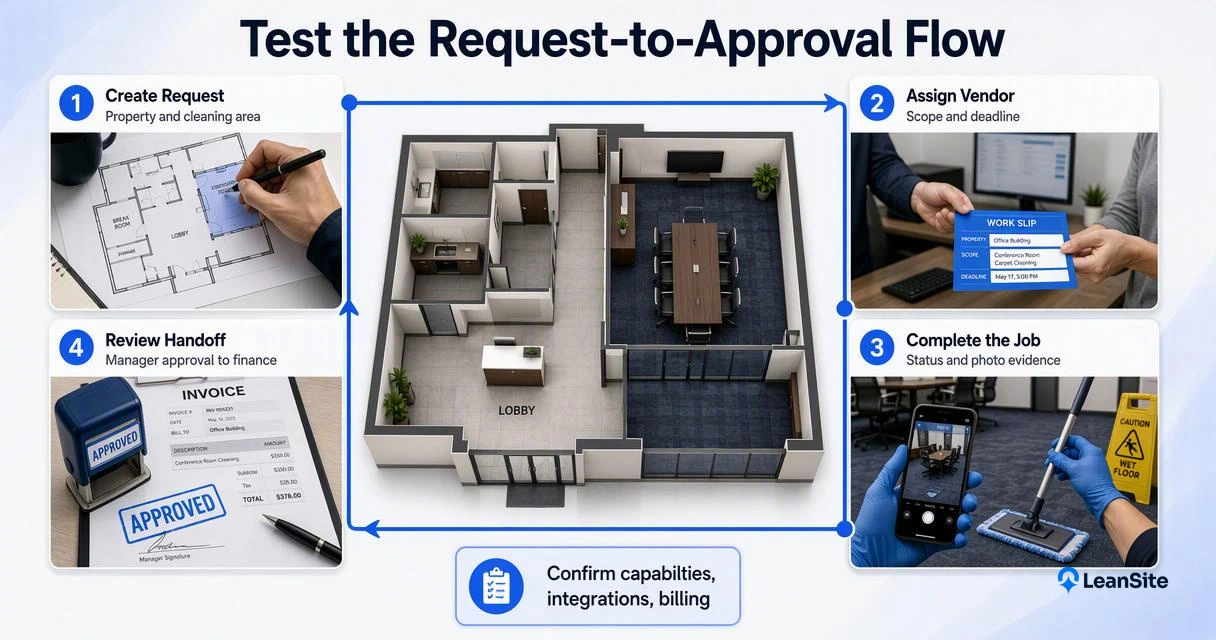
A useful demonstration makes the dispatcher, cleaner, property manager, and finance handoffs visible in sequence.
-
Create a request tied to a specific property and cleaning area.
-
Show how the assigned vendor receives the scope and deadline.
-
Present completion evidence to the authorized reviewer.
-
Demonstrate the agreed billing handoff and reporting view.
The campus work order transparency guide offers relevant reading for cleaning contracts with several building stakeholders.
Measure a pilot before expanding
A pilot should establish a baseline for dispatch time, approval turnaround, reopened jobs, and completion-to-invoice time. Compare results across similar work rather than unrelated sites. Set acceptance criteria before rollout, including crew adoption and usable reporting.
Teams adding locations can also review when basic work order software stops scaling.
Expand after the pilot proves that field records reach the right reviewer and finance team.
Cleaning software buyer FAQs
Cleaning software decisions usually turn on billing fit, evidence requirements, and implementation scope.
Can work order software replace accounting software?
Work order software can organize the records that support an invoice, but it shouldn't be assumed to replace accounting software. Buyers should confirm tax handling, payment reconciliation, credit notes, and export or integration options. A demonstration should show exactly where the approved job becomes a financial transaction.
Are photos enough to prove cleaning quality?
Photos support completion evidence, but they don't establish every quality requirement. A useful record combines permitted images with the agreed checklist, timestamps, and inspection results. Sensitive areas may need restrictions on photography. Customer acceptance should follow the contract's inspection criteria rather than rely on images alone.
Should every location adopt the system at once?
A limited pilot usually provides a clearer starting point than an immediate portfolio-wide rollout. Select locations with representative schedules, access rules, and customer approval needs. Establish common status definitions first, then expand once crews, supervisors, and finance teams can complete the same workflow consistently.
Conclusion
Choose commercial cleaning work order software by testing a complete service cycle, not a feature slideshow. Prepare one recurring clean and one chargeable extra, identify each approval owner, and request a Leansite walkthrough at getleansite.com. Use the resulting records to assess dispatch clarity, evidence quality, and invoice readiness before committing to rollout.
