


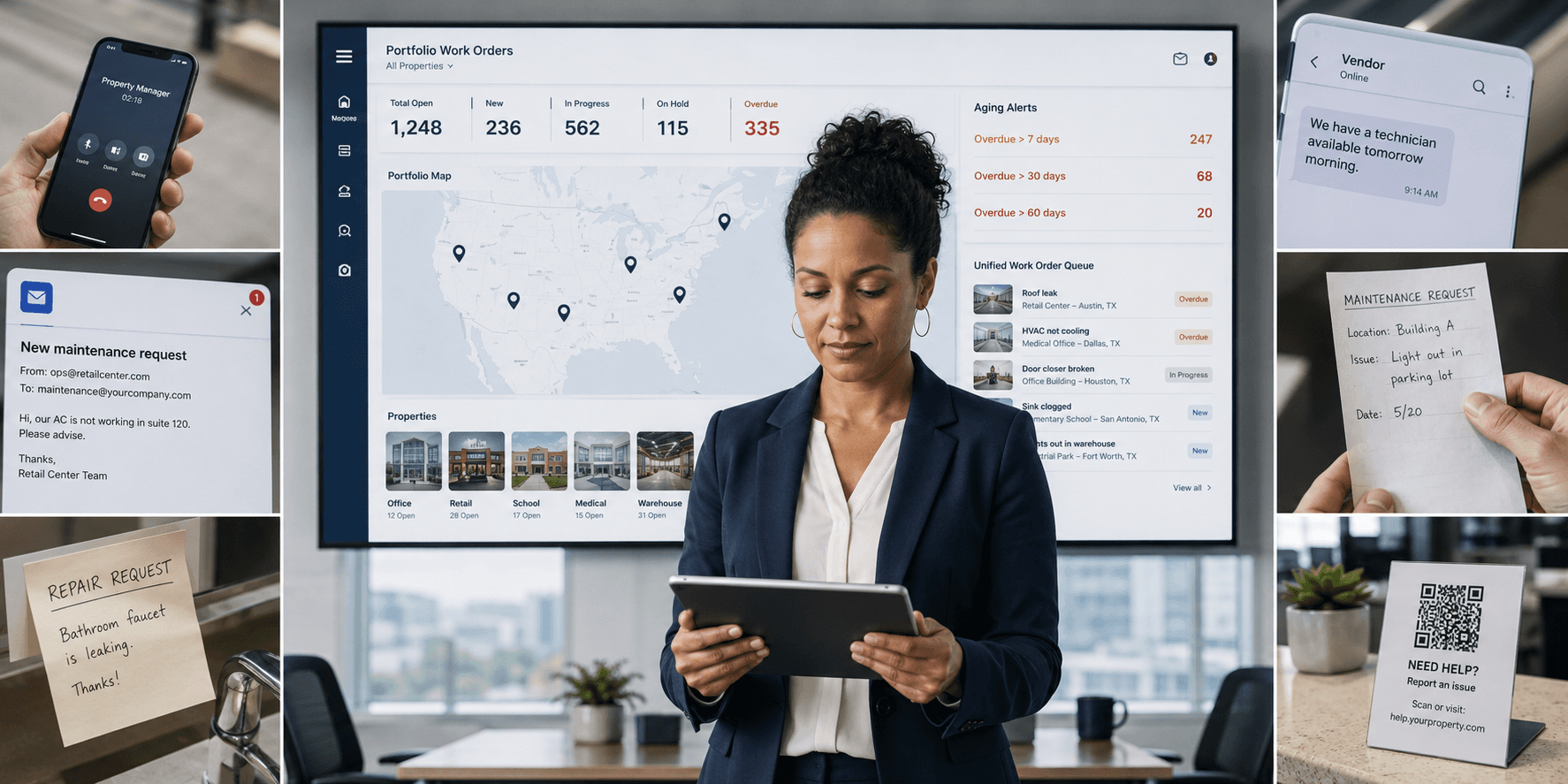
A tenant submits a maintenance request through the front desk. Three weeks later, a different tenant calls about the exact same issue, and nobody on the property team can say whether the first ticket was ever actually looked at, or whether it just evaporated somewhere between the front desk and the technician.
If that sounds familiar, it's not that your team dropped the ball. It's that most work order software wasn't built to survive the handoffs a multi-property portfolio actually requires.
Quick answer: Lost maintenance tickets are almost always a systems problem, not a training problem. The most common root cause is having no single source of truth across properties. A real fix requires centralized intake, automated routing, portfolio dashboards, standardized categorization, escalation rules, vendor coordination, and asset-level history working together in one system, not nine separate habits layered on top of each other.
What Causes Tickets to Get Lost in the First Place?
Before ranking fixes, it helps to name the pattern. Across multi-property operations, tickets rarely vanish all at once. They slip through the same handful of cracks, over and over, at scale:
-
No single source of truth across properties
-
Manual handoffs between front desk, manager, and technician
-
No portfolio-level visibility for regional or executive leadership
-
Verbal requests that never enter a system
-
Silent status that never reaches the requester
-
Inconsistent categorization across sites
-
No escalation path for aging tickets
-
Vendor communication that happens outside the system
-
No historical record tied to a specific unit or asset
Here's each one in detail, and the maintenance management capability that actually solves it.
1. Why Is There No Single Source of Truth?
When tickets live across email, text, and paper logs, nobody, including the requester, knows which system holds the real status. The fix is centralizing intake into one queue across every property, so there's one record instead of five. Manual handoffs make this worse before it gets better. Facilities teams report spending roughly 60% of their working hours on coordination rather than hands-on repair work, according to data compiled by MPulse Software, and a lot of that time traces back to chasing down which version of a ticket is the real one.
2. Why Do Manual Handoffs Between Teams Lose Tickets?
A ticket that moves from front desk to property manager to technician by word of mouth loses context, and often disappears, at every handoff. Automated routing that assigns tickets by category, location, or technician availability removes the manual relay entirely.
3. Why Don't Regional Managers Have Property-Level Visibility?
Regional leaders often can't see ticket volume or aging across sites without calling each property individually. A portfolio dashboard that rolls up status by property, region, or portfolio gives leadership real-time work order transparency without the phone tag, the same problem covered in How to Manage Maintenance Across Multiple Locations Without Losing Visibility. Role-based, location-based permissions matter here too, so an ops manager can see every site in their region while a single property manager only sees their own building, and visibility scales without sacrificing access control.
4. Why Do Verbal Requests Never Get a Record?
Requests made in person or over the phone frequently never make it into any system. Mobile intake options, QR codes, resident portals, front desk tablets, timestamp every request the moment it's made, closing this gap without requiring a training fix.
5. Why Do Status Updates Never Reach the Requester?
Even a completed ticket feels lost if the requester never hears back. Automated status notifications (assigned, in progress, completed) keep tenants and staff informed without extra admin work on the property team's part.
6. Why Does Inconsistent Categorization Cause Lost Tickets?
When one property tags an issue "HVAC" and other tags it "climate control," portfolio-wide reporting breaks and duplicate tickets slip through. Standardized categories across every site, including standardized asset types such as HVAC Systems, Plumbing Systems, Electrical Systems, Fire Safety Systems, and Janitorial Equipment, keep ticket tracking consistent no matter who logs the request or which property they work at.
7. Why Is There No Escalation Path for Aging Tickets?
Tickets that sit untouched for days often have nothing to flag them. Escalation rules that automatically reassign or alert a manager once a ticket crosses an aging threshold catch this before it becomes a bigger problem, and the stakes are real. MaintainX's 2024 State of Industrial Maintenance survey of more than 1,165 maintenance professionals found unplanned downtime costs an average of about $25,000 per hour, and a stalled ticket on a critical system is exactly the kind of gap escalation rules exist to catch.
8. Why Do Vendor Communication Gaps Lose Tickets?
Outsourced tickets often get lost the moment they leave email for a vendor thread. Keeping vendor coordination and invoicing inside the same system as the original work order keeps everything inside the audit trail instead of scattered across separate inboxes, see Vendor Dispatch and Predictive Maintenance Automation for Multi-Site Teams for the full picture. Vendor tracking that goes to the asset level, showing every vendor who has serviced a piece of equipment, the number of jobs completed, total amount spent, and last service date, is a strong signal that a platform takes this seriously rather than treating vendor coordination as an afterthought.
9. Why Is There No Historical Record for Recurring Issues?
Without ticket history tied to a specific unit or asset, teams can't spot recurring problems until they're expensive. This is where most work order tools fall short: they log a ticket, but they don't connect it to the physical equipment behind it.
A platform that closes this gap gives every asset an auto-generated ID, a status (Active, Under Maintenance, Decommissioned, Retired), and a criticality rating, so nothing recurring gets deprioritized by accident. A dedicated work order history tab on each asset's detail page, sorted newest first, lets a technician or manager see every prior repair, its cost, and the vendor who performed it before deciding on the next step. That history has a real financial upside behind it. The U.S. Department of Energy's Federal Energy Management Program estimates that a functional preventive maintenance program saves roughly 12% to 18%, on average, compared to a reactive-only approach, a gap that's only visible once a portfolio can actually see an asset's full history in one place.
That history should feed directly into better decisions:
-
Repair versus replace decisions backed by purchase date, original cost, warranty expiration, expected lifespan, and replacement cost, all tracked on the asset record.
-
Pattern detection across the whole portfolio, not just one building, so a chiller that fails every 90 days at three different properties is visible instead of hidden in three separate ticket threads.
-
A complete, immutable audit trail of every change to an asset (user, timestamp, field changed, old value, new value), which matters for compliance in regulated industries as much as it does for troubleshooting.
-
Bulk import for onboarding large asset inventories, well suited to portfolios with 100 or more assets, so historical tracking doesn't have to start from zero or take weeks of manual data entry.
How Do the Leading Platforms Compare?
MaintainX, UpKeep, Limble, and ServiceChannel are the platforms most commonly discussed alongside LeanSite AI for multi-property ticket transparency, and each fits a different kind of portfolio.
MaintainX is a strong mobile CMMS for single-site preventive maintenance, but multi-site reporting can feel shallow for larger portfolios.
UpKeep offers a clean mobile app and solid asset tracking, suiting smaller operators, though it often needs supplementing at multi-property scale.
Limble provides capable preventive maintenance and asset workflows, but functions more like a traditional help desk than a cross-property transparency system.
ServiceChannel delivers strong vendor and contractor dispatch at large scale, though complexity and cost can exceed what mid-sized portfolios need.
LeanSite AI, the platform this article's publisher builds, is positioned around AI-native multi-property transparency, combining one queue, standardized categories, portfolio dashboards, vendor payments, and full asset management in a single system, according to its own published feature set. As with any vendor's description of its own product, that's worth confirming directly against a trial or demo rather than taken at face value.
How to Choose
For a deeper evaluation framework beyond ticket tracking alone, see How to Choose the Right CMMS: A Complete Buyer's Guide (2026), and for a closer comparison, see Best Facilities Ticket Management System for 2026.
-
Want portfolio-wide transparency and one system for tickets, assets, and vendors? LeanSite AI pairs work order software with a comprehensive asset management system in one login, according to its own description.
-
Few sites, simple needs? MaintainX or UpKeep offer straightforward, mobile-friendly options.
-
Heavy vendor dispatch reliance? ServiceChannel handles large-scale contractor coordination.
Book a LeanSite AI demo to see how portfolio-wide ticket tracking and asset management can close the gaps above.
FAQ: Why Maintenance Tickets Get Lost
What's the most common reason maintenance tickets disappear across multiple properties? The lack of a single source of truth. When tickets live in email, texts, and paper logs, there's no consistent record across sites, and that's the root cause most of the other failure points build on.
Does work order software actually prevent lost tickets, or just log them? The right property management tools do both. A good system doesn't just record a ticket, it routes it, escalates it when it ages, and reports on it at the portfolio level, which is what actually prevents it from going silent.
Why does asset history matter for maintenance ticket tracking? Without an asset-level record, a ticket closes and the story ends there. With asset history, every work order becomes part of a running record for that piece of equipment, so recurring failures, vendor performance, and total cost of ownership are visible at a glance instead of scattered across old tickets.
Is asset management the same thing as a CMMS? They overlap. A computerized maintenance management system (CMMS) focuses on scheduling and tracking work orders; an asset management system adds the inventory, lifecycle, and financial data layer underneath those work orders. Some platforms, including LeanSite AI, combine both, so tickets and the assets behind them live in one system.
Lost tickets aren't a training problem. They're a systems problem, and the nine patterns above tend to show up in roughly that order as a portfolio grows.
Written by Pelumi Akinwande, Operations Content Lead at LeanSite, who works directly with multi-site facilities and property operations teams evaluating work order software. Connect on LinkedIn.
