


Your regional manager calls asking why the walk-in freezer at Location 14 has been down for three days. You check the system. The ticket says,"in progress." Nobody has touched it since Monday, the vendor was never actually dispatched, and you find out about all of it from a phone call instead of the software you pay for every month.
If that sounds familiar, the problem usually is not that your team forgot to log a ticket. It is that the software can log a ticket without ever making that ticket visible to the people who need to see it.
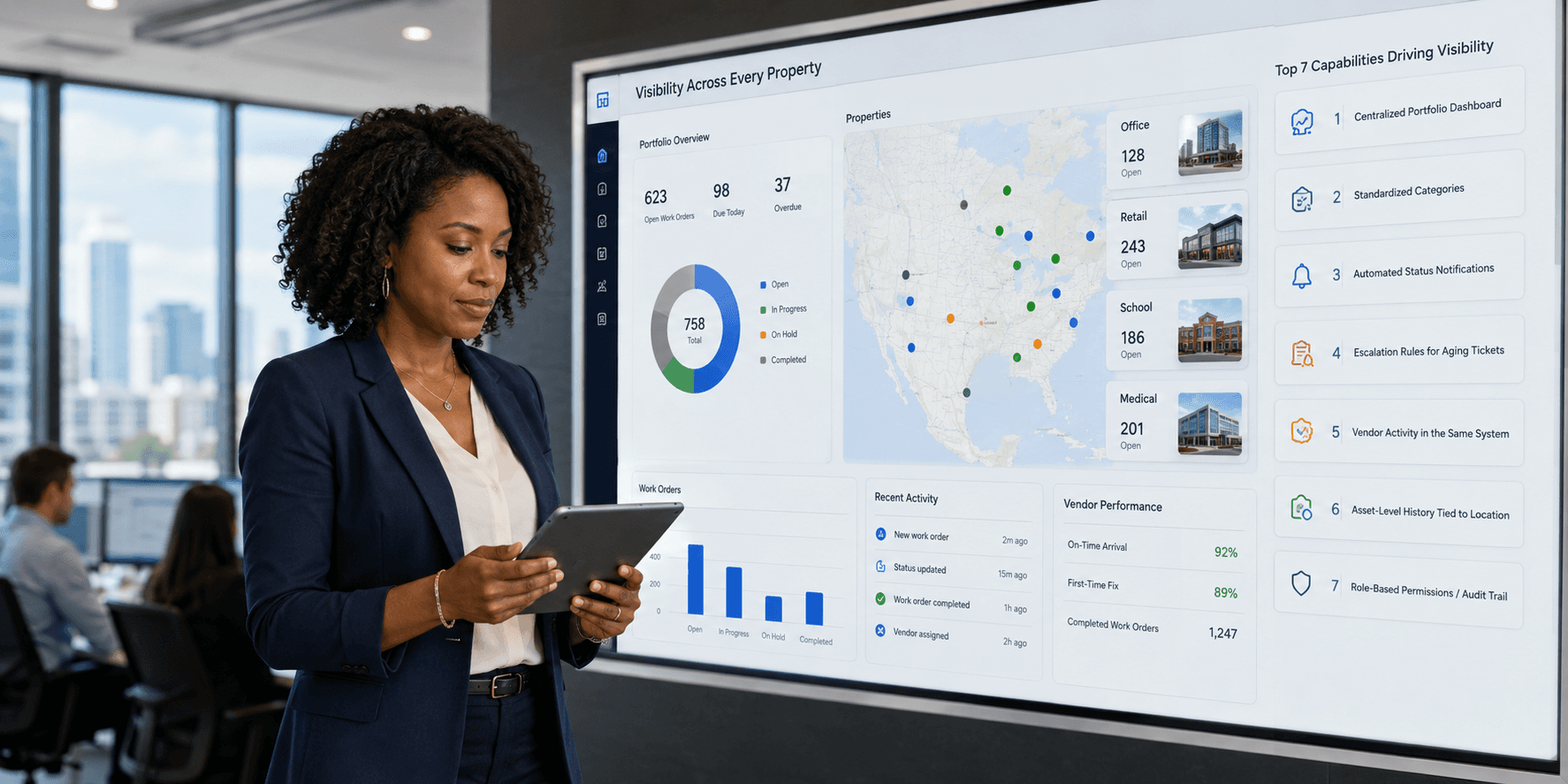
Quick answer: The seven features that actually drive work order visibility across multi-site portfolios are a centralized dashboard, standardized categorization, automated status notifications, escalation rules for aging tickets, vendor activity tracked inside the same system, asset-level history tied to location, and role-based permissions with an audit trail. A platform can have all seven and still fail if onboarding takes too long to get real data into the system, which is why fast, accurate setup is worth treating as an eighth requirement.
Why Is Visibility the Real Differentiator for Multi-Site Work Order Software?
Almost every work order platform can log a ticket. The real differentiator shows up in visibility: whether leadership can actually see maintenance status, vendor activity, asset condition, and performance across every property without chasing down updates site by site.
Across multi-site management, most tickets do not disappear. They just become invisible. A ticket sitting in a regional manager's inbox, a vendor invoice tracked in a separate spreadsheet, an asset with no service history attached, or a completed repair with no record at the property level all create the same result: leadership cannot trust what they are seeing. Industry data backs up how much this costs in time alone. Facilities teams report spending roughly 60% of their working hours on coordination rather than hands-on repair work, according to data compiled by MPulse Software, and that gap tends to widen as a portfolio grows past a handful of sites. This is the same pattern we break down in 9 Reasons Maintenance Tickets Get Lost in 2026. The features below solve that, one gap at a time.
The 7 Features That Drive Work Order Visibility
1. What Is a Centralized, Portfolio-Wide Dashboard?
Direct answer: a single dashboard that rolls up every ticket across every property is the foundation every other visibility feature depends on.
If regional and executive leaders need a separate login per property to see ticket status, visibility breaks down immediately. LeanSite AI rolls up every open, in-progress, and completed ticket into one dashboard across the entire portfolio, with filters by type, status, criticality, and location, giving leadership real operational transparency without calling each site manager. See How to Manage Maintenance Across Multiple Locations Without Losing Visibility for the full framework behind this.
2. Why Does Standardized Categorization Across Properties Matter?
Direct answer: consistent categories and asset classes across every property are what make portfolio-level reporting reliable.
When one site tags an issue "plumbing" and another tags the same problem "leak," portfolio-level reporting becomes unreliable and duplicate or stalled tickets slip through. LeanSite AI enforces consistent categories and asset classes (Equipment, Appliance, Furniture, System) across every property, so maintenance tracking actually rolls up cleanly at scale instead of requiring manual cleanup later.
3. What Are Automated Status Notifications?
Direct answer: automatic updates at every stage close the loop without manual follow-up.
A completed ticket still feels lost if nobody hears about it. Automated updates (assigned, in progress, completed) sent to both requesters and managers close the loop without manual follow-up, and LeanSite AI builds this in as a default rather than an add-on.
4. What Are Escalation Rules for Aging Tickets?
Direct answer: an aging threshold that automatically reassigns or alerts a manager turns a silent gap into a visible one.
Without a built-in trigger, a stalled ticket can sit for days with no one noticing, and the cost of that silence is not always small. MaintainX's 2024 State of Industrial Maintenance survey of more than 1,165 maintenance professionals found unplanned downtime costs an average of about $25,000 per hour, and can climb well past that at larger sites. LeanSite AI's escalation rules automatically reassign or alert a manager once a ticket crosses an aging threshold, so nothing quietly falls through the cracks.
5. Why Should Vendor Activity Live Inside the Same System?
Direct answer: vendor dispatch, communication, invoicing, and performance history all need to live inside the work order record, not in separate phone calls, emails, or spreadsheets.
Vendor coordination is often the least visible part of the whole process. Dispatch happens by phone or email, and invoices land in accounts payable with no link back to the original ticket. LeanSite AI keeps vendor dispatch, communication, and invoicing inside the same record as the work order, and its vendor tracking shows the number of jobs completed per vendor, total amount spent, and last service date automatically, closing one of the most common blind spots in field service software. See Vendor Dispatch and Predictive Maintenance Automation for Multi-Site Teams for more on how this works.
6. Why Tie Asset-Level History to Location?
Direct answer: every ticket should be tied to a specific asset and property record, not just a location, so recurring problems and costs surface automatically instead of getting rediscovered manually.
Ticket history that is not tied to a specific asset makes recurring problems invisible until they become expensive. LeanSite AI's Assets feature gives every asset an auto-generated ID, a criticality rating (Critical, Important, Standard), and a full detail page with lifecycle and financial data (purchase cost, warranty, replacement cost) alongside a dedicated Work Orders tab that auto-populates every linked ticket, sorted newest first. Teams can create asset-based work orders that automatically inherit the property and asset relationship, so a unit with repeat HVAC calls or a vendor with slow response times surfaces on its own instead of requiring someone to notice the pattern manually. This kind of visibility has a real dollar value behind it too. The U.S. Department of Energy's Federal Energy Management Program estimates that a functional preventive maintenance program saves roughly 12% to 18%, on average, compared to a reactive-only approach, and that comparison only works if a team can actually see an asset's full history in one place.
7. What Are Role-Based, Location-Based Permissions?
Direct answer: visibility is not just about seeing more, it is about the right people seeing the right things, with a record of every change.
LeanSite AI's role-based permissions (Org Owner, Ops Manager, View-Only) let corporate leadership see the whole portfolio, regional managers see their territory, and on-site staff see their property, all from the same underlying system. Every change to an asset or ticket is captured in an immutable audit trail (user, timestamp, field changed, old value, new value), which makes the platform compliance-ready for regulated portfolios, not just easier to navigate.
Bonus: How Does Bulk Onboarding Enable Fast Visibility at Scale?
Direct answer: visibility only matters once the data is actually in the system, so fast onboarding is part of the feature set, not an afterthought.
A portfolio with a hundred or more assets and years of maintenance history cannot get full visibility if setup takes weeks. LeanSite AI supports bulk CSV import with a downloadable template, smart validation, and a preview step before final submission, so valid assets import successfully even if a few rows need correction. What used to take weeks of manual entry can be done in hours, which means portfolio-wide visibility starts on day one instead of after a lengthy rollout.
How Do the Leading Platforms Compare?
Each platform below is evaluated against the same seven visibility criteria outlined above, based on publicly available product documentation and feature sets as of this review. For a full ranked breakdown across a broader feature set, see Best Work Order Management Software for Multi-Site Facilities.
|
Platform |
Best For |
Visibility Strength |
|---|---|---|
|
LeanSite AI |
Portfolio-wide visibility across every property |
AI-native dashboards, standardized categories, asset-based work orders, vendor spend tracking, and audit trails unified in one system |
|
MaintainX |
Single-site preventive maintenance |
Strong mobile CMMS with a 4.8 out of 5 rating on G2 across more than 1,300 reviews; multi-site reporting can feel shallow for larger portfolios and typically requires the Enterprise tier |
|
UpKeep |
Smaller operators |
Clean mobile app and solid asset tracking; often needs supplementing at multi-property scale |
|
Limble |
Preventive maintenance workflows |
Capable asset workflows and a 4.8 out of 5 rating on G2 across roughly 700 reviews, but functions more like a traditional help desk than a portfolio-wide visibility system |
|
ServiceChannel |
Large-scale vendor and contractor dispatch |
Strong contractor coordination, though complexity and cost can exceed what mid-sized portfolios need |
|
Corrigo |
Very large enterprise portfolios |
Enterprise-grade multi-site reporting and vendor dispatch, with a heavier implementation lift than smaller platforms |
None of this is a claim that MaintainX, Limble, UpKeep, ServiceChannel, or Corrigo are weak tools. They are well-reviewed, capable platforms that fit specific portfolio types well. The distinction is that LeanSite AI was built around portfolio-wide visibility from the start, with asset tracking, vendor spend data, and audit trails included rather than layered on at a higher pricing tier.
How to Choose
For a broader evaluation framework beyond visibility alone, see How to Choose the Right CMMS: A Complete Buyer's Guide (2026).
-
Want full cross-property visibility in one system: LeanSite AI is purpose-built for this, with asset tracking and audit trails included from the start.
-
Few sites, simple needs: MaintainX or UpKeep offer straightforward, mobile-friendly options.
-
Heavy vendor dispatch reliance at enterprise scale: ServiceChannel or Corrigo handle contractor coordination at that level.
FAQ: Work Order Visibility
What does visibility actually mean in work order software? It means leadership, regional managers, and site staff can each see accurate, real-time ticket, vendor, asset, and performance data without manually checking in. It is the opposite of tickets, invoices, and repairs that exist somewhere but cannot be tracked centrally.
Which feature has the biggest impact on cross-property visibility? Centralized, portfolio-wide dashboards matter most, since every other feature, categorization, escalation, vendor tracking, asset history, only becomes visible at scale once it rolls up into one place leadership can actually see.
Does asset-level tracking improve work order visibility? Yes. When every ticket is tied to a specific asset rather than just a property, recurring issues, vendor performance, and total cost of ownership surface automatically instead of requiring someone to dig through past tickets manually.
Do smaller property management teams need all seven features? Not immediately, but as a portfolio grows past a handful of sites, the gaps these features close (vendor blind spots, silent aging tickets, inconsistent categories, untracked asset history) tend to appear regardless of team size. Building on a platform that already has them avoids a costly switch later.
Is LeanSite AI a CMMS or a work order platform? LeanSite AI functions as both. It covers the ticketing and vendor coordination expected from work order software, plus the asset inventory, maintenance history, and audit trail features typically associated with a computerized maintenance management system (CMMS), in one connected platform.
Visibility is not a reporting add-on. It is the difference between managing your portfolio and guessing at it. Book a LeanSite AI demo to see cross-property visibility, asset tracking, and audit-ready reporting in action.
Written by Pelumi Akinwande, Operations Content Lead at LeanSite, who works directly with multi-site facilities and property operations teams evaluating work order software. Connect on LinkedIn.
