


TL;DR
Organize maintenance records from portfolio to property, building, floor, system, and maintainable equipment. Keep permanent equipment IDs separate from location names, and represent shared systems once. Start with one building, verify records against physical equipment, then expand the structure across the portfolio.
A rooftop unit needs one reliable identity, even when several floors depend on it. A facility asset hierarchy connects equipment to its location and operating system so maintenance teams can find records, assign work, and review costs consistently. For commercial portfolios in 2026, the useful structure isn't the deepest tree; it's the one technicians, vendors, and owners can interpret without guesswork.
Asset hierarchy: A parent-child arrangement showing where equipment belongs and how it relates to larger locations, systems, and assemblies.
Table of Contents
What is a facility asset hierarchy?
A facility asset hierarchy is a structured index connecting a portfolio's properties, buildings, locations, systems, and maintainable equipment. It gives each record a defined place while allowing maintenance history and costs to be grouped at useful levels. Location describes where equipment sits; system membership describes what it supports.
Location: A physical place, such as Building A, Floor 2, or Mechanical Room 201.
System: A functional grouping, such as HVAC, electrical distribution, or domestic water.
Maintainable asset: Equipment that merits its own inspections, work orders, repair history, or replacement decisions.
A location remains useful after equipment replacement. A pump's identity, however, belongs to that particular pump. Keeping those concepts separate supports clearer multi-location facilities management.
Functional locations versus equipment records
Functional locations organize the operating structure; equipment records track individual physical units.
How should commercial buildings structure their records?
- Define the portfolio as the reporting root.
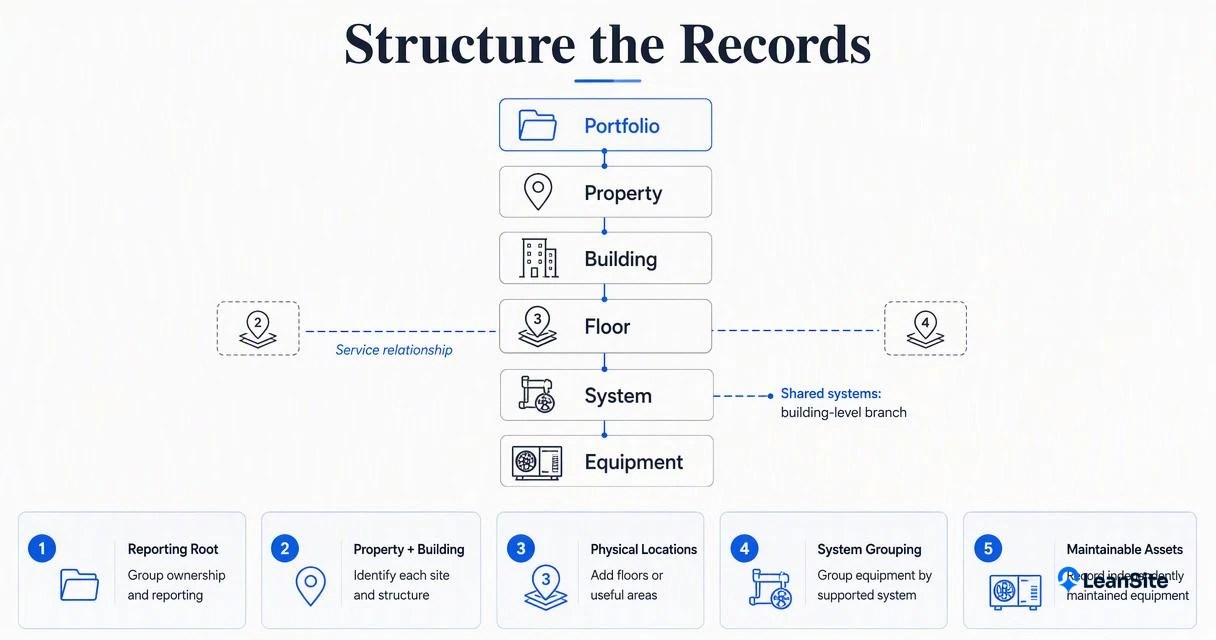
- Add each property and its buildings beneath it.
- Create floors or other useful physical locations.
- Group equipment by the system it supports.
- Add independently maintained equipment as asset records.
- Record cross-floor service relationships separately from physical location.
Worked example: Harbor Office Center
A six-level model works for equipment serving a local area; shared infrastructure needs a building-level system branch.
| Level | Example record | Purpose |
|---|---|---|
| Portfolio | North Region Offices | Group ownership and reporting |
| Property | Harbor Office Center | Identify the site |
| Building | Building A | Separate building operations |
| Floor | Floor 02 | Locate maintenance work |
| System | Floor 02 HVAC | Group local HVAC equipment |
| Equipment | VAV-021 | Track one terminal unit |
For this illustrative building, VAV-021 sits on Floor 02 and belongs to that floor's HVAC branch. A rooftop unit serving Floors 01 through 03 instead belongs under Building A > Central HVAC > RTU-001, with Roof recorded as its physical location.
The floor level isn't mandatory for every branch. A parking area, central plant, or external generator can sit beneath the property or building as appropriate.
Separate containment from service coverage
One canonical equipment record should hold the maintenance history, while relationships identify the spaces it serves.
A shared system should appear once in the hierarchy, even when its service area spans several floors.
Work orders can reference that equipment ID and the affected room. That distinction supports clearer campus work-order visibility without copying the same unit into multiple location branches.
How can naming rules prevent duplicate assets?
- Assign each physical asset a permanent unique ID.
- Store readable names separately from identifiers.
- Use controlled equipment-type and location labels.
- Match imports against IDs, serial numbers, and locations.
- Require approval before creating uncertain records.
- Retire replaced equipment while preserving its maintenance history.
Copy-ready fields and naming conventions
Stable IDs keep maintenance history attached to equipment even when its location or display name changes.
- Asset ID:
AST-000421, permanent and never reused. - Display name:
BLDG-A-ROOF-RTU-01, readable and editable. - Parent record ID: The location or system parent used by the maintenance system.
- Physical location:
Building A / Roof / West. - System membership:
Central HVAC. - Identity fields: Manufacturer, model, serial number, and commissioning date.
- Service fields: Criticality, responsible team, maintenance plan, and status.
Avoid encoding every detail into the permanent ID. A moved pump shouldn't need a new identity. Use a documented equipment dictionary so RTU, rooftop unit, and vendor shorthand don't become separate equipment types.
Reconcile records before bulk import
Duplicate checks should compare several identifiers rather than treating a matching name as proof.
A vendor's "Roof AC 1" and an internal "RTU-001" may describe the same unit. Verify the serial number and physical location before merging records. Preserve work orders, attachments, and former names as aliases.
Assign one data steward to approve new assets and review exceptions. Consistent records make long-term facilities data more useful for replacement planning.
How Leansite handles this
Leansite provides a relevant facilities-management setting for applying this structure to maintenance workflows. The hierarchy above is a recommended data model, not a claim that every level is a native platform field. A configuration review should confirm how parent records, equipment identities, and service relationships are represented.
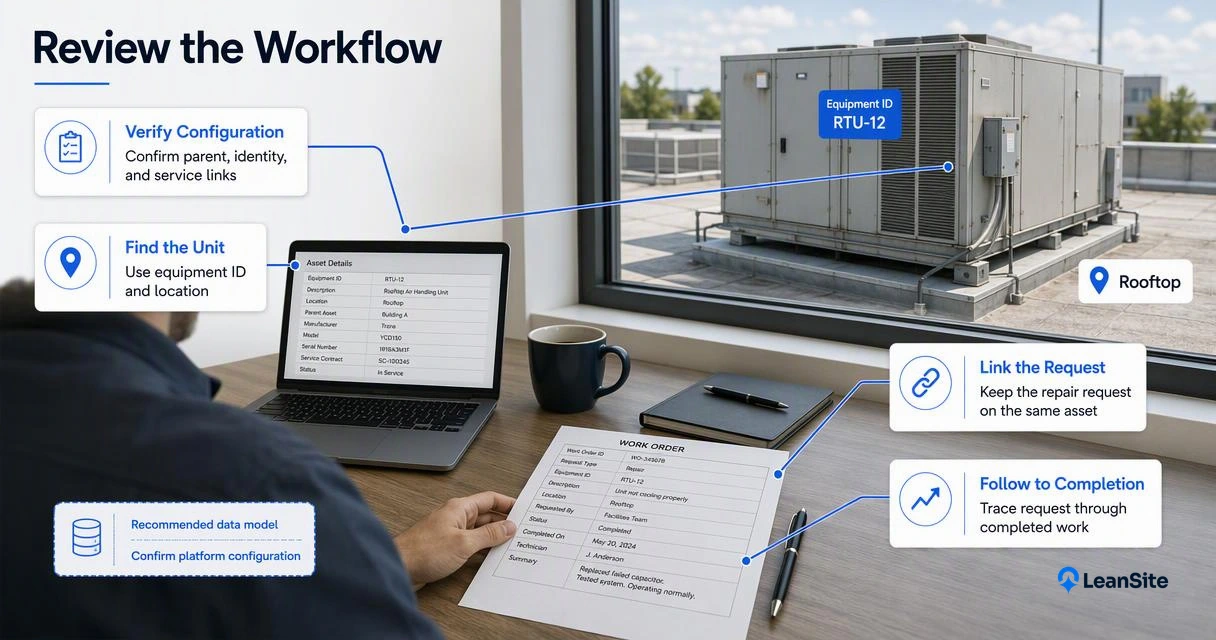
A practical demonstration should use the Harbor Office Center example:
Validate the structure through real maintenance tasks
A useful platform review follows an asset from request through completed work.
- Find the rooftop unit by equipment ID and location.
- Associate a repair request with the same equipment record.
- Check how vendor updates and completion evidence remain accessible.
- Confirm which property and system cost views are available.
Teams considering AI-assisted facilities software should also test whether similar names remain distinguishable. The Vera assistant overview provides a related starting point for evaluating assistant workflows.
Conclusion
Start a facility asset hierarchy with one building, one shared system, and a verified equipment list. Approve naming rules, reconcile identities, and test a complete work-order cycle before expanding. Teams evaluating the Leansite platform can visit getleansite.com and request a demonstration using that same sample structure.
