


TL;DR
A strong mobile maintenance app should capture requests, photos, status updates, approvals, completion notes, and asset history from the field. Facility teams should prioritize offline access, role-based workflows, vendor coordination, and multi-site visibility before paying for extras like AI summaries or advanced analytics.
A work order that waits until the end of a shift is already late. A mobile facility maintenance app gives technicians, vendors, and facility managers one shared place to log issues, assign work, add photos, approve spend, and close jobs in real time. Mobile facility maintenance app: software used on phones or tablets to manage maintenance requests, work orders, inspections, assets, vendors, and documentation from the field. For teams comparing tools in 2026, Leansite is built around field visibility, task tracking, and multi-location maintenance workflows without turning daily work into paperwork.
Table of Contents
What is a mobile facility maintenance app?
A mobile facility maintenance app is a field-first system for creating, assigning, tracking, approving, and documenting facility maintenance work from a smartphone or tablet. It connects technicians, vendors, managers, and owners around the same job record, so status, photos, notes, costs, and completion proof stay attached to the work order.
Traditional facility software often starts at the desktop. Mobile-first maintenance starts where the work happens: at the HVAC unit, kitchen line, restroom, roof hatch, loading dock, or tenant space.
Key terms:
-
Work order: a task record that describes the issue, location, assignee, priority, due date, and outcome.
-
Asset history: the service record tied to equipment, systems, or spaces.
-
Location-based service: software that uses geographic data to provide services or information, matching the Wikipedia definition of location-based service.
-
CMMS: computerized maintenance management system, usually focused on maintenance planning, labor, parts, and assets.
"The most dangerous phrase in the language is, 'We've always done it this way.'", Grace Hopper, Yale News
That quote fits facility maintenance because paper tickets, text threads, and spreadsheet logs still hide real operating risk. In multi-site operations, delayed updates can create duplicate dispatches, unclear vendor invoices, and missed preventive tasks. A mobile system reduces that lag by turning each field action into a timestamped record.
What features should facility teams require in 2026?
Facility teams should require real-time work orders, photo capture, asset records, approvals, vendor access, offline mode, notifications, and reporting before considering advanced add-ons. Nice-to-have features matter, but the core app must first make field work easier than texting, calling, or updating a spreadsheet later.
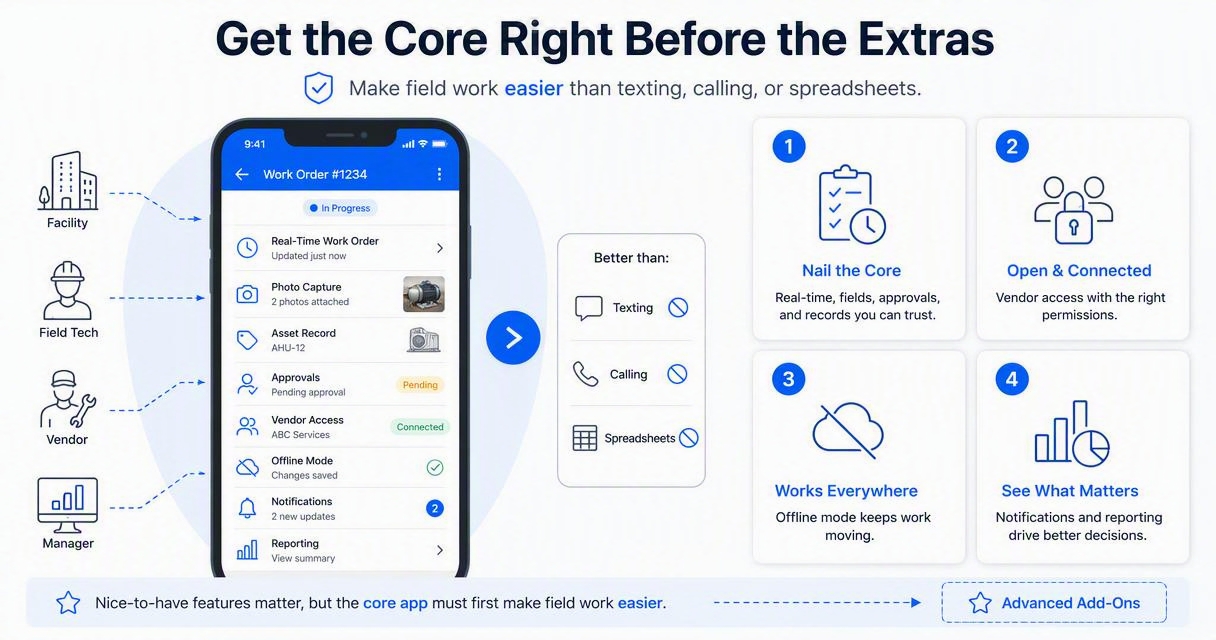
Must-have vs nice-to-have checklist
|
Feature |
Must-have or nice-to-have |
Why it matters |
|---|---|---|
|
Mobile work orders |
Must-have |
Creates one source for task details, priority, status, and assignee |
|
Photo and video uploads |
Must-have |
Shows issue condition before and after work |
|
Completion notes |
Must-have |
Captures what was done, what failed, and what needs follow-up |
|
Approval workflows |
Must-have |
Controls spend before vendors start out-of-scope work |
|
Vendor portal or vendor app access |
Must-have |
Keeps third parties inside the job record |
|
Offline mode |
Must-have |
Supports basements, mechanical rooms, roofs, and weak-signal sites |
|
Asset and location hierarchy |
Must-have |
Ties repairs to equipment, rooms, buildings, and regions |
|
Push notifications |
Must-have |
Speeds acknowledgement, escalation, and closure |
|
QR or barcode scanning |
Nice-to-have |
Speeds asset lookup in the field |
|
AI summaries |
Nice-to-have |
Condenses long notes, but still needs clean field data |
|
Predictive maintenance analytics |
Nice-to-have |
Helps forecast failures once enough history exists |
|
IoT sensor integrations |
Nice-to-have |
Adds automatic alerts for some assets and systems |
Buying filter for operations leaders
The strongest buying filter is simple: the app should reduce calls, not create extra admin work. A useful field workflow usually follows these steps:
-
A request is submitted with location, category, and photos.
-
A manager triages priority and assigns an internal tech or vendor.
-
The assignee updates status from the field.
-
Approvals are captured before extra cost is incurred.
-
Completion notes, photos, and labor details close the record.
-
Reports show trends by site, asset, vendor, and category.
Teams planning a broader software review can compare mobile workflows against multi-site maintenance software buying criteria, especially when several buildings or regions share vendors.
How do technicians, vendors, and managers use mobile workflows?
Mobile workflows help each role act on the same job without waiting for office updates. Technicians document work, vendors submit proof and notes, and facility managers approve, prioritize, and monitor service levels across locations.
For technicians, the app replaces memory-based updates. The job record shows where to go, what asset is involved, what parts or tools may be needed, and what happened last time. Photos make the problem visible before the technician arrives.
For vendors, mobile access reduces invoice disputes. A vendor can accept dispatch, add arrival notes, request approval for extra work, upload completion photos, and attach service details. That creates cleaner handoff between the facility team and accounts payable.
For managers, the value is visibility. Open work by status, overdue jobs, repeat issues, and vendor response times become easier to review. Teams that need deeper multi-site practices can read more on managing maintenance across multiple locations without losing visibility.
Field workflow example
-
Request: a store manager reports a leaking ceiling tile with two photos.
-
Triage: the facilities manager marks it urgent and assigns a roofing vendor.
-
Dispatch: the vendor receives the work order, checks in, and uploads roof-condition photos.
-
Approval: the vendor requests approval for a temporary patch and follow-up quote.
-
Closeout: completion notes, photos, cost details, and warranty notes stay attached to the site record.
Key insight: Real-time updates are less about speed for its own sake and more about trust. A complete job record shows who did what, when it happened, and what still needs attention.
Helpful video overview
The video gives useful context for teams that are new to formal facilities management. In practice, the mobile app becomes the daily operating layer that turns broad facilities responsibilities into assignable, trackable work.
How Leansite handles mobile facility work
The Leansite platform helps facility teams move requests, tasks, photos, status updates, and vendor coordination into a single operating flow. It is especially relevant for commercial properties, restaurants, retail groups, and other multi-location teams that need fast field updates without losing portfolio-level visibility.
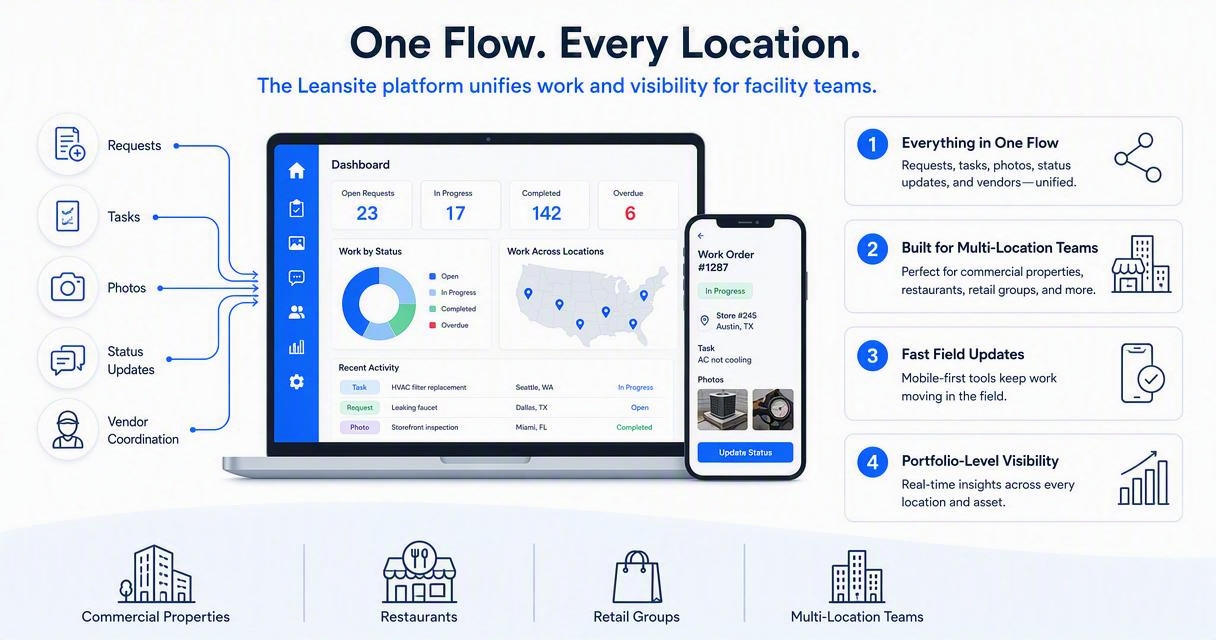
Leansite supports the practical side of maintenance: issue capture, job tracking, assignment, vendor communication, and closeout documentation. The goal is not to replace judgment. The goal is to give managers, owners, technicians, and vendors a cleaner record of what is happening across every location.
For teams evaluating dedicated app access, the Leansite app is the natural next step after defining required workflows. More product details are available at getleansite.com.
Where mobile data improves decisions
|
Decision area |
Mobile data that helps |
Better outcome |
|---|---|---|
|
Vendor performance |
Response time, completion notes, photos |
Easier vendor scorecards and fewer disputes |
|
Asset planning |
Repeat work orders, failure notes, repair history |
Smarter repair-or-replace calls |
|
Budget control |
Approval records, job costs, category trends |
Better cost visibility by site or region |
|
Preventive maintenance |
Inspection results, missed tasks, condition photos |
Fewer reactive surprises |
Predictive programs depend on clean historical data. A field app creates that record one work order at a time, which supports later planning around predictive maintenance and facility uptime.
How it compares with common app categories
|
Category |
Typical strength |
Common fit |
|---|---|---|
|
CMMS apps such as eMaint, Fiix, or Eptura Asset |
Asset-heavy maintenance programs |
Industrial or equipment-dense teams |
|
Work order apps such as UpKeep or MaintainX |
Fast technician task handling |
Maintenance teams with high daily ticket volume |
|
Facility platforms such as FMX, ServiceChannel, or Zoho Creator |
Requests, vendors, and business workflows |
Schools, retail, service businesses, or custom app users |
|
Leansite |
Multi-location visibility plus practical field coordination |
Commercial operators that need faster maintenance execution across sites |
Neutral comparison matters because no single product fits every operating model. Facility teams with complex enterprise CMMS requirements may value asset depth first. Teams with distributed locations often care more about visibility, dispatch, approvals, and repeatable closeout.
What should facility leaders expect next?
Facility leaders should expect mobile maintenance apps to become more automated, more location-aware, and more AI-assisted through 2027. The biggest change will not be flashy dashboards; it will be cleaner field data feeding faster triage, smarter scheduling, and more accurate maintenance planning.
Generative AI is already shaping business software, but research also warns that organizations must manage risks around accuracy, governance, and policy. Dwivedi, Kshetri, Hughes, and coauthors discuss both opportunities and challenges in a 2023 International Journal of Information Management paper on generative conversational AI.
"When you can measure what you are speaking about, and express it in numbers, you know something about it.", Lord Kelvin, Wikiquote
That measurement mindset is where mobile maintenance is heading. AI can summarize a work order, suggest categories, or flag repeat issues, but it still depends on accurate photos, notes, timestamps, and asset history. For a deeper look at this direction, see AI facility management software trends.
2027-ready capabilities to watch
-
AI-assisted triage: automatic priority suggestions based on asset, issue type, site, and safety risk.
-
Smarter vendor routing: assignment based on trade, location, availability, past performance, and approval limits.
-
Condition-based alerts: sensor or inspection data creating maintenance tasks before a full failure.
-
Portfolio benchmarking: category, asset, and vendor comparisons across regions.
-
Voice-to-work-order capture: faster field notes for technicians wearing gloves or working in tight spaces.
The best preparation is not chasing every new feature. Clean categories, consistent closeout notes, and disciplined asset records will make future automation far more useful.
FAQ
What is the main benefit of using a mobile maintenance app?
The main benefit is real-time visibility into facility work. Requests, photos, assignments, approvals, status updates, and completion notes are captured while work is happening. That reduces follow-up calls, missing documentation, duplicate dispatches, and unclear vendor handoffs across single-site and multi-site operations.
Can vendors use the same maintenance app as internal teams?
Many modern platforms allow vendor access through a portal, mobile app, or limited-role login. Vendor access should support dispatch acceptance, status updates, photo uploads, approval requests, completion notes, and invoice backup. Role-based permissions matter because vendors should only see the jobs and locations assigned to them.
Does a mobile app replace a CMMS?
A mobile app does not always replace a CMMS. Some apps are part of a CMMS, while others focus on facility requests, vendor work, and task tracking. Asset-heavy teams may still need a full CMMS. Multi-location facility teams may prioritize mobile dispatch, visibility, approvals, and closeout documentation.
How should a facility team evaluate app adoption?
Adoption should be evaluated by field usage, not just software features. Strong signs include faster status updates, more completed photo records, fewer missing notes, shorter approval cycles, and cleaner vendor documentation. If technicians and vendors avoid the app, the workflow is probably too slow or poorly matched to daily work.
Conclusion
A mobile facility maintenance app is worth adopting when it makes field work clearer, faster, and easier to prove. The best next step is to map the current request-to-closeout process, separate must-have features from nice-to-haves, test the workflow with technicians and vendors, and review the first month of data by site, asset, and vendor. For teams ready to modernize multi-location maintenance, head to getleansite.com and review how Leansite fits the daily work order flow.
