


TL;DR
Emergency maintenance software works best when it combines fast intake, automated routing, escalation rules, mobile updates, and cost visibility. Facility teams should prioritize tools that turn HVAC failures, leaks, electrical issues, and safety hazards into documented workflows instead of scattered calls and texts.
A midnight roof leak or failed rooftop unit can become a tenant complaint, a safety risk, and a cost-control problem within minutes. Emergency facility maintenance software gives facility teams a single system for urgent repair intake, dispatch, escalation, mobile documentation, and spend tracking. Emergency facility maintenance software: software that manages urgent facility repairs from first report through completion, including priority rules, technician or vendor assignment, status updates, documentation, and cost reporting. For teams that need a practical system rather than another inbox, Leansite helps organize urgent work across locations, vendors, and assets.
Table of Contents
What is emergency facility maintenance software?
Emergency facility maintenance software is a work management system that helps facilities teams capture urgent repair requests, assign the right responder, escalate missed steps, and document completion in real time. It usually sits inside a CMMS, facility management platform, or work order system built around assets, locations, vendors, and service histories.
Wikipedia defines facility management as the coordinated management of buildings, sites, workplaces, and support services needed to keep them functional, safe, and effective for occupants. A computerized maintenance management system, or CMMS, maintains a database of maintenance operations, which is the foundation for emergency work tracking.
Key takeaway: Emergency repair management is not just faster ticketing. It connects response speed, safety, accountability, and cost control in one record.
Common emergency scenarios include:
- HVAC failure in a retail store during peak hours
- Active water leaks near electrical panels or merchandise
- Power loss, tripped breakers, or lighting failures in occupied areas
- Broken doors, locks, gates, or access systems
- Safety hazards such as spills, ceiling damage, alarms, or blocked exits
The 2026 software market reflects this shift. SERP competitors such as UpKeep, MaintainX, Coast, Fiix, Limble, Corrigo, FMX, and Gartner-listed facility platforms all frame maintenance software around centralized requests, reactive work, preventive maintenance, and reporting. The stronger buying question is narrower: can the system handle a real emergency after normal business hours?
How does software handle urgent repairs after hours?
Software handles urgent repairs after hours by turning every emergency request into a routed, prioritized, time-stamped workflow that can notify internal staff, assign vendors, trigger escalation, and capture updates from mobile devices.
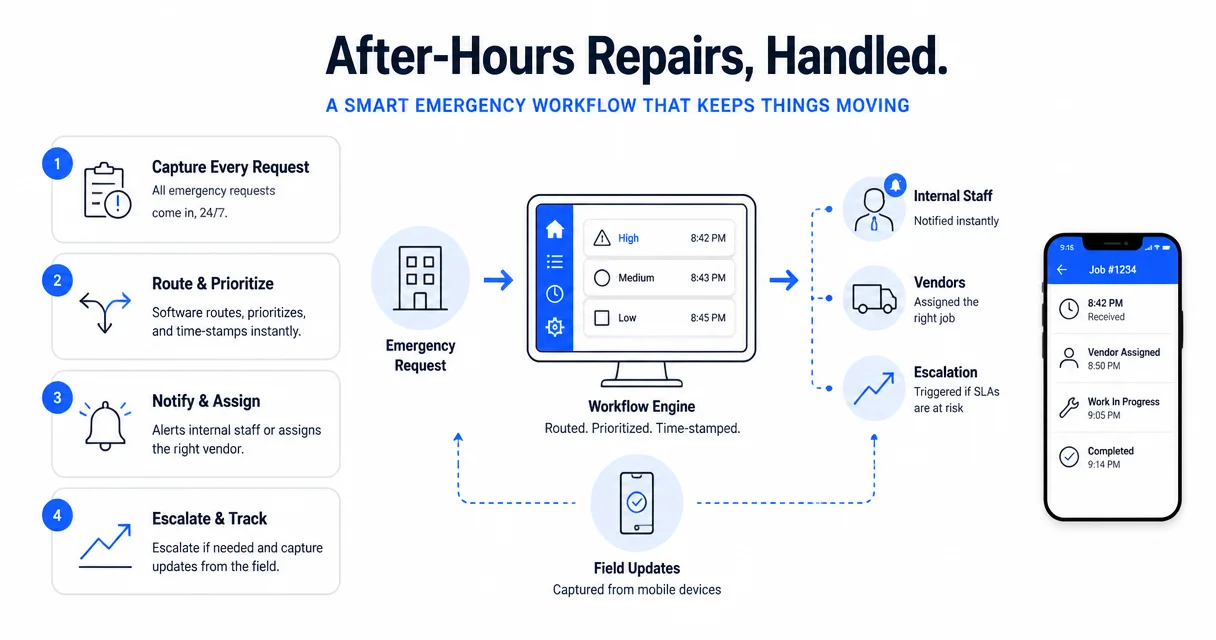
Emergency workflow steps
A practical emergency workflow usually follows the same pattern, even when the asset or location changes:
- Capture the issue: A manager, tenant, store employee, or technician submits a request with photos, location, and severity.
- Classify the priority: Rules tag issues such as leak, power outage, no cooling, access failure, or safety hazard.
- Route the work: The system assigns an internal technician or approved vendor based on trade, region, contract, and availability.
- Escalate if needed: Missed acceptance, no ETA, or overdue status triggers alerts to a supervisor or backup vendor.
- Update from the field: Mobile notes, photos, labor, parts, and completion status create a live repair record.
- Review cost and cause: The final work order connects spend, asset history, response time, and recurring failure patterns.
After-hours routing matters because emergencies rarely follow office calendars. A good system should distinguish a comfort complaint from a revenue-stopping HVAC outage, or a slow drain from an active leak above inventory.
Research on the Internet of Things highlights why connected assets now matter for maintenance planning. The Internet of Things Strategic Research Roadmap describes a direction where connected devices, sensors, and systems support more automated monitoring and response. In facilities, that trend points toward leak sensors, equipment alerts, and AI-assisted triage feeding directly into work orders.
Teams exploring automation can compare this with broader AI facility management software patterns, especially where triage and follow-up reminders reduce manual chasing.
Which features matter most during emergencies?
The most important emergency maintenance features are priority intake, after-hours routing, vendor dispatch, escalation rules, mobile updates, asset history, compliance documentation, and cost tracking.
Feature checklist for urgent repairs
| Feature | Why it matters in an emergency | Example |
|---|---|---|
| Priority request intake | Separates true emergencies from routine work | Active leak marked P1 |
| Location and asset tagging | Reduces time spent identifying equipment | Rooftop unit RTU-4 at Store 112 |
| Vendor assignment | Sends work to the right trade fast | Licensed electrician dispatched |
| Escalation rules | Prevents stalled tickets | No acceptance in 15 minutes alerts manager |
| Mobile updates | Gives live status from the field | Technician uploads breaker panel photo |
| Document storage | Keeps invoices, photos, permits, and notes together | Water remediation photos attached |
| Cost tracking | Shows emergency spend by asset and site | Repeat compressor failures flagged |
| Reporting | Helps leaders spot chronic problems | Leak costs grouped by property |
Safety documentation deserves special attention. OSHA states a simple standard that applies directly to facility emergency response:
"Employers have a responsibility to provide a safe workplace.", Occupational Safety and Health Administration, About OSHA
That responsibility makes documentation more than paperwork. Photos, timestamps, vendor notes, shutoff steps, and approval trails can show that a hazard was reported, assigned, and corrected with reasonable urgency.
For portfolio teams, emergency workflows also need multi-site visibility. A facilities director should be able to see which locations have open critical issues, which vendors are late, and which assets keep failing. The complete guide to multi-location facilities management software is a useful next read for teams managing regional or national operations.
How should teams compare emergency maintenance platforms?
Teams should compare emergency maintenance platforms by testing how each system performs under pressure, not by counting generic CMMS features on a sales page.
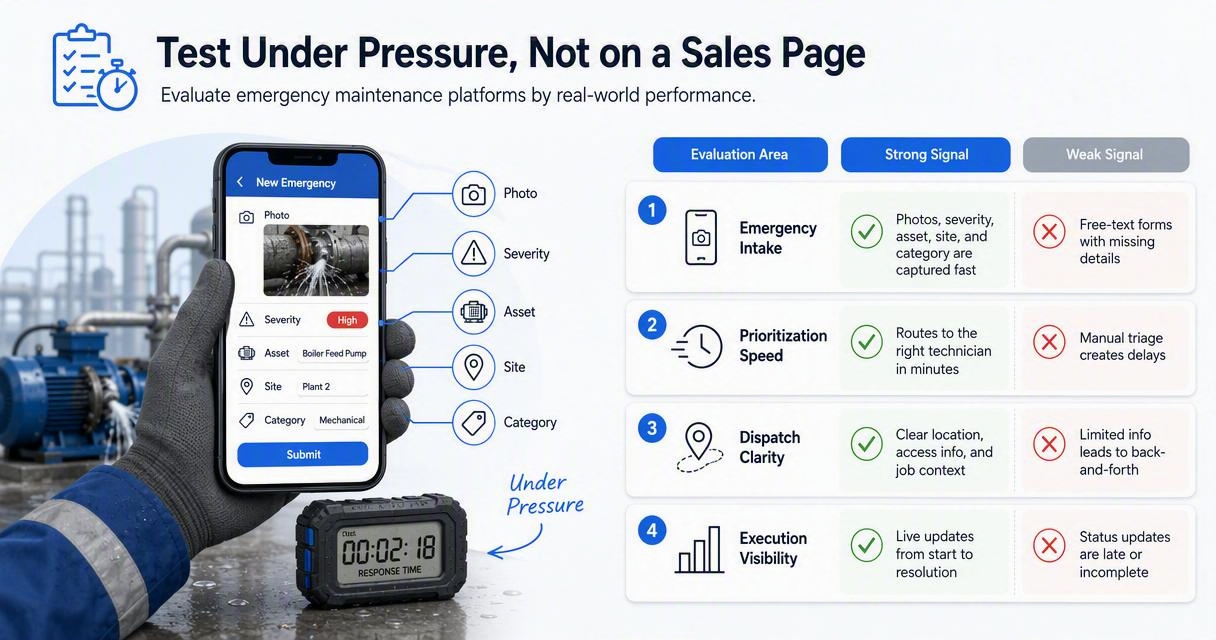
Buying criteria for 2026
| Evaluation area | Strong signal | Weak signal |
|---|---|---|
| Emergency intake | Photos, severity, asset, site, and category are captured fast | Free-text forms with missing context |
| Dispatch logic | Rules route by trade, region, SLA, and availability | Manual forwarding by email |
| Escalation | Alerts trigger when acceptance or completion is late | Managers must remember to follow up |
| Vendor workflow | Vendors can accept, update, invoice, and attach proof | Vendors work outside the system |
| Mobile use | Field teams can update jobs from phones | Desktop-only workflows |
| Cost reporting | Spend rolls up by asset, vendor, site, and category | Invoices live in a separate tool |
| Offline access | Work continues in basements, plants, and low-signal areas | No signal means no record |
Several popular platforms cover broad facility maintenance needs. UpKeep positions CMMS around one queue for requests and preventive maintenance. MaintainX emphasizes reactive maintenance, preventive work, and daily operations. Gartner Peer Insights lists facility management products such as FMX, Binocs, and Corrigo for comparison-based research.
The difference appears during the test scenario. A buyer can simulate a Sunday HVAC failure, an active leak, and an electrical hazard across three locations. The best platform should show who received the work, who accepted it, when escalation fired, what the vendor documented, and how costs appeared in reporting.
For teams comparing the broader market, the guide to best multi-site maintenance software in 2026 explains why location structure, portfolio reporting, and vendor coordination often matter more than long feature lists. Teams evaluating MaintainX specifically can also review MaintainX alternatives from a facility operations angle.
How Leansite supports emergency maintenance
The Leansite platform supports emergency maintenance by organizing urgent work, vendors, task status, documentation, and cost visibility around real facility operations.
Emergency-ready workflows with Leansite
Leansite fits teams that need urgent repairs to move cleanly from request to resolution without losing context. A facility manager can track an HVAC failure, leak, electrical issue, or safety hazard as a structured work item with ownership, status, supporting files, and follow-up history.
Useful emergency workflows include:
- Assigning work by site, trade, vendor, or internal owner
- Tracking status from reported to dispatched to completed
- Keeping photos, notes, invoices, and approvals in one place
- Reviewing repeated emergency spend by location or asset
- Giving operations leaders clearer visibility across many properties
AI will keep changing emergency maintenance in 2026 and 2027. Instead of waiting for a person to read every request, newer tools can help categorize issues, suggest next steps, and surface overdue work. The article on Vera, the AI assistant built into Leansite shows how AI assistance can support faster facilities workflows.
Predictive maintenance also matters because the cheapest emergency is often the one prevented. Asset history, inspection findings, and recurring work orders can point toward replacement, vendor review, or planned service. The guide to maximizing facility uptime with predictive maintenance covers that shift from reactive repair toward planned uptime.
For a closer look at how Leansite handles maintenance operations, facility teams can visit getleansite.com.
Conclusion
Emergency facility maintenance software works when it turns chaos into a repeatable response system: capture the issue, route the right person, escalate delays, document the fix, and analyze the cost. Facility leaders evaluating tools in 2026 should run live scenarios before buying, especially after-hours HVAC failure, active leak, electrical issue, and safety hazard workflows. To see how Leansite supports urgent maintenance across locations and vendors, head to getleansite.com and request a focused emergency-workflow walkthrough.
