


A professor's office hasn't had AC working for two weeks. The ticket was logged in the university's CMMS, the same platform used to track forklift maintenance at the physical plant, and it's sitting in a queue with three hundred other unsorted requests from six different buildings.
If that sounds familiar, you're not managing it wrong. You're running a general CMMS against a problem it wasn't built to solve, and most higher education facilities departments hit this wall eventually.
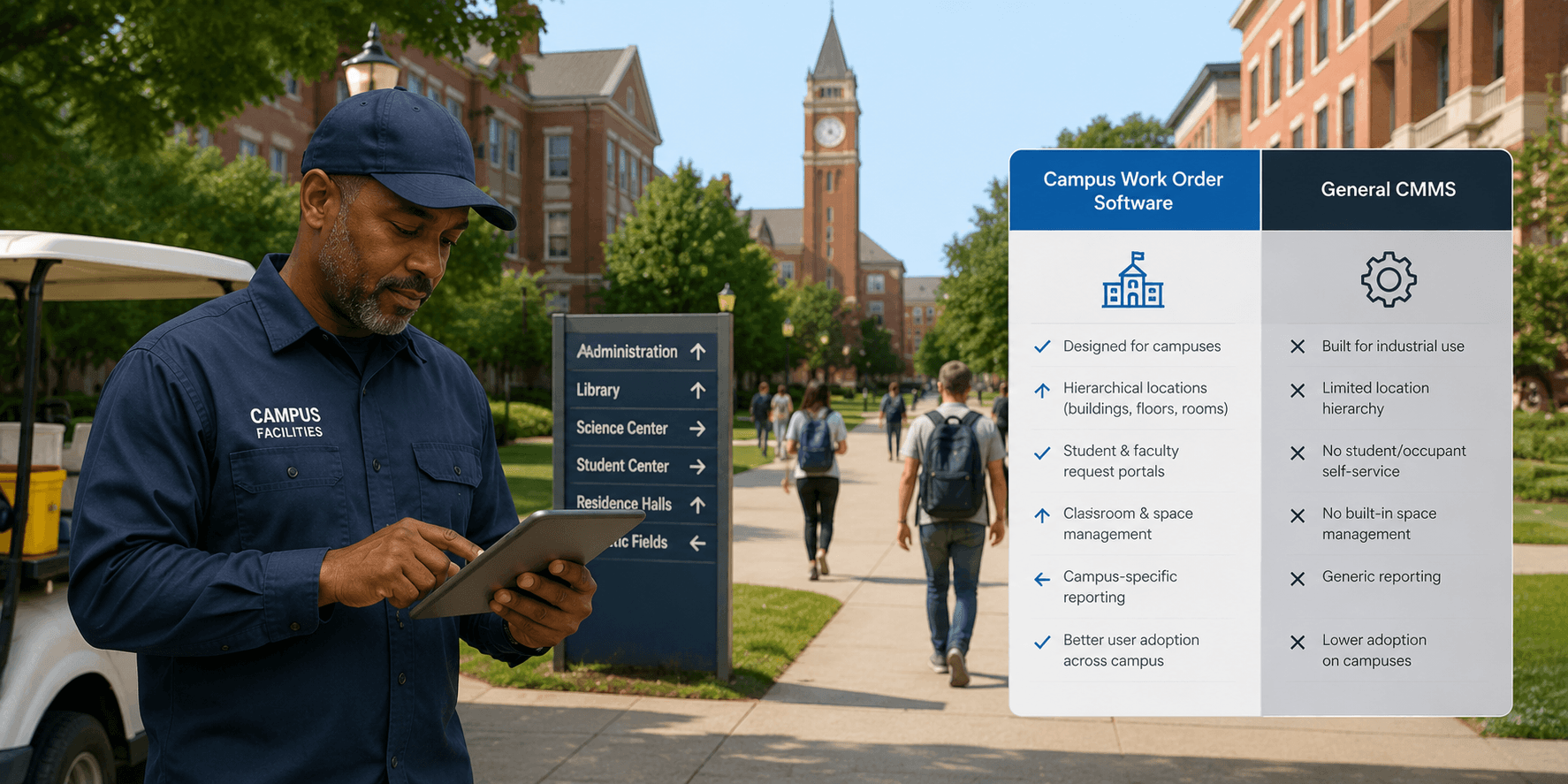
Quick answer: Higher education facilities leaders often assume the gap between a general CMMS and campus-specific work order management software is a matter of price or nice-to-have features. In practice, the gap traces back to what the software was originally built to handle. General CMMS platforms are typically designed around a single site or a small number of similar locations, while campus-specific systems are built for many buildings, high requester turnover, and a wide vendor mix from the start.
Facilities leaders comparing options for multi-campus operations often start by looking at general CMMS platforms, the same tools built for manufacturing plants, single office buildings, or industrial maintenance. That starting point makes sense on paper, since most CMMS platforms handle preventive maintenance, asset tracking, and ticketing in some form. The gap shows up once a facilities department tries to apply that software across a real multi-campus operation with dozens of buildings, shared vendors, and constant turnover in requesters.
What Is Campus-Specific Work Order Software?
Campus-specific work order software is a type of facilities management software that centralizes maintenance requests, tracking, and reporting across every building on a campus, or across several campuses, from a single system built around the scale and turnover of a higher education operation, instead of a single-site workflow with multi-location features layered on afterward.
Most institutions notice this pattern once they're managing more than a handful of buildings with different staffing levels, vendor relationships, or requester turnover. Below that, a general CMMS can feel like enough.
What Gaps Appear When a General CMMS Gets Applied to a Campus?
No cross-campus visibility by default. Most general CMMS platforms require extra configuration, or a higher pricing tier, to get portfolio-wide reporting working across many buildings. A single dashboard that rolls up ticket status, aging, and completion rates across every building from day one, the way LeanSite AI's Portfolio Health Score does with a per-building ranking, closes this gap directly instead of requiring it to be assembled from separate reports.
Intake that doesn't survive requester turnover. Campuses have thousands of people submitting requests, students, faculty, staff, with high annual turnover, and there's no time to train a rotating population on a complicated system every fall. Simpler, more durable intake methods, like QR codes or mobile forms tied to LeanSite AI's Bulk Work Orders for pushing the same intake template across every selected building at once, stay consistent even as the people submitting requests change every semester.
Categorization that drifts building by building. General CMMS platforms often leave categorization loosely configured per site, so one building tags an issue "HVAC" while another tags the same problem "climate control," quietly breaking institution-wide reporting. Enforced Type and Class fields on every asset record prevent this drift at the system level instead of depending on every building remembering the same convention.
Vendor coordination sized for a narrower list. Campuses rely on a wide mix of vendors across HVAC, plumbing, electrical, grounds, and specialty equipment, more than most general CMMS platforms assume. A dedicated vendor record on every asset, tracking which vendors have serviced it, how many jobs each has completed, and total amount spent, with routing that cascades automatically down a ranked list when the top choice doesn't respond, keeps that trail visible on the same record instead of scattered across inboxes and separate accounts payable processes.
Why Does This Look Different by Institution Type?
The specific pattern often depends on the kind of institution you're running.
Large public university systems deal with high requester turnover and dozens of buildings, which makes standardized, low-effort intake especially important. Non-exempt facilities staff, the category that includes electricians, custodians, and maintenance workers, make up about 28% of the higher education workforce and has shrunk by roughly 9% since 2017, according to CUPA-HR's 2025 workforce data, so these institutions increasingly cannot staff their way around a mismatched system.
Smaller private colleges and community college districts, by contrast, often manage a leaner facilities team across a tighter budget, where the challenge is less about requester volume and more about visibility into an older building portfolio with fewer staff to catch what the software misses. That gap compounds the deferred maintenance pressure already facing the sector. U.S. higher education institutions carry a combined deferred capital renewal backlog of $112.3 billion, according to a 2021 analysis by APPA and Gordian, and Gordian's 2026 State of Facilities in Higher Education report puts the current burden at $156 per gross square foot, an 8% increase in a single year.
How Does LeanSite AI Compare to MaintainX and Limble for Campus Portfolios?
MaintainX and Limble are two of the platforms most frequently discussed for centralized work order systems in higher education, alongside ServiceChannel for vendor-heavy portfolios and Planon for large, enterprise-scale university systems. Both MaintainX and Limble are capable, well-reviewed tools. But if you're evaluating either for a campus with real vendor and reporting complexity, each tends to show the gaps above most clearly once you grow past a handful of buildings.
|
Capability |
MaintainX |
Limble |
LeanSite AI |
|---|---|---|---|
|
Best fit |
Fast, mobile-first deployment |
Preventive maintenance workflows |
Campus portfolios with vendor and reporting complexity |
|
Centralized cross-campus dashboard |
Per-building view, limited roll-up |
Roll-up reporting on higher tiers |
Portfolio Health Score with per-building ranking |
|
Intake built for requester turnover |
Basic mobile forms |
Standard request portal |
Bulk Work Orders push the same template across selected buildings |
|
Vendor cost and performance tracking |
Limited |
Limited |
Dedicated vendor record per asset |
|
Asset-level work order history |
Available |
Available |
Auto-populated Work Orders tab per asset |
This isn't a claim that MaintainX or Limble are poor tools. They're not. Both hold a 4.8 out of 5 rating on G2, across more than 1,300 and roughly 700 verified reviews respectively, and both fit single-building or straightforward preventive maintenance needs well. It's that the gaps described above are what to check for as a campus scaleales past a handful of buildings, regardless of which platform you're evaluating. LeanSite AI, our facilities management platform, was built to close these specific gaps directly, which is worth weighing if the pattern above sounds familiar.
Where Does a General CMMS Still Make Sense?
This isn't a case where campus-specific software is simply superior across the board. A smaller institution with one or two buildings, a stable maintenance team, and straightforward preventive maintenance needs may get everything required from a general CMMS without paying for campus-specific features it won't use. The tradeoff becomes more significant as the number of buildings, requesters, and vendors grows. We compare this category distinction more broadly in CMMS vs Facility Management Software: A 2026 Decision Guide.
- Many buildings, high requester turnover, complex vendor mix: campus-specific work order management software is likely to go deeper than a general CMMS.
- Smaller footprint, stable internal maintenance team: a general CMMS like Limble may cover what's needed without added complexity.
For a closer look at this comparison, see Best Work Order Software for Campus Facilities in 2026, and for a related angle on rollout structure, see Centralized vs Decentralized Work Orders for Campuses.
See How LeanSite AI Compares for Your Campus
The clearest way to weigh this tradeoff against your own building count and vendor mix is to see it directly. Book a LeanSite AI demo to walk through your specific portfolio.
FAQ: Campus Work Order Software vs General CMMS
What's the core difference between campus work order software and a general CMMS? Campus-specific software is built around the scale and variability of higher education operations, many buildings, high requester turnover, diverse vendors, while general CMMS platforms are typically designed around a single site or a smaller, more predictable maintenance operation.
Does a small college need campus-specific software, or is a general CMMS enough? For a small institution with one or two buildings and a stable maintenance team, a general CMMS often covers what's needed. The case for campus-specific software strengthens as building count, requester turnover, and vendor complexity grow.
How much does vendor coordination differ between the two categories? General CMMS platforms often assume a smaller, more predictable vendor list, while campus-specific systems are more likely to be built for the wider, more variable vendor mix that larger institutions rely on across trades and specialties.
Is LeanSite AI a MaintainX or Limble alternative for higher education? For campuses where vendor cost tracking, cross-building reporting, and requester-turnover-proof intake are the main pain points, LeanSite AI is built specifically to address those gaps at scale. For simpler, single-building or purely mobile-first deployments, MaintainX or Limble may already cover what you need. See the comparison above for where each platform fits best.
The gap between a general CMMS and campus-specific software rarely shows up on a features list. It usually shows up the first semester a portfolio outgrows what the software was originally built to handle.
Written by Pelumi Akinwande, Operations Content Lead at LeanSite, who works directly with multi-campus facilities and operations teams evaluating work order software. Connect on LinkedIn.
