


TL;DR
A strong CMMS demo should prove how the system handles real work orders, preventive maintenance, reporting, mobile use, vendors, and permissions. Facility teams should bring sample scenarios, compare vendors side by side, and confirm implementation, support, and pricing details before signing.
A polished demo can make almost any maintenance platform look easy, so a CMMS demo checklist for facility managers should focus on real daily work instead of canned screens. CMMS: A computerized maintenance management system tracks work orders, assets, preventive maintenance, labor, parts, vendors, and reporting in one operational record. Facility management, as defined by Wikipedia, coordinates buildings, workplaces, and support services so spaces stay functional, safe, and effective. Platforms such as Leansite are strongest in a demo when the buying team asks vendors to show actual workflows, not just feature menus.
Table of Contents
What should a CMMS demo prove?
A CMMS demo should prove that the platform can capture requests, assign work, track assets, support mobile field teams, report performance, and fit existing operations without heavy workarounds. The best demos follow the life of a real job from request to closeout, then show the data available to managers after the work is done.
A 2023 Buildings paper on SMARTS-based CMMS selection frames CMMS buying as a multi-criteria decision, not a simple feature match. That matters because the best-looking interface may not score highest for implementation, maintenance planning, data quality, or long-term building operations.
"In God we trust; all others must bring data.", W. Edwards Deming, The W. Edwards Deming Institute
Strong demos use data from the facility team: sample assets, common request types, technician roles, service-level targets, and vendor categories. A broader buying framework can also help, especially when comparing platforms across budget, scope, and rollout risk; see this 2026 CMMS buyer's guide for deeper selection criteria.
Demo evidence to request
-
A live work order created from a request, not a prebuilt ticket
-
Asset history tied to the job, including photos and notes
-
Preventive maintenance schedules based on calendar or meter triggers
-
Mobile technician steps for accepting, updating, and closing work
-
Manager dashboards showing backlog, labor, cost, and response time
-
Vendor access rules, job dispatch, and invoice or completion tracking
-
Implementation timeline, data import process, and support coverage
Core workflow checklist for work orders and assets
The core workflow checklist should test whether the CMMS can move a request through triage, assignment, execution, approval, and reporting with minimal manual cleanup. Facility managers should ask vendors to show the same scenario across desktop and mobile views because daily adoption usually depends on technicians, not executives.
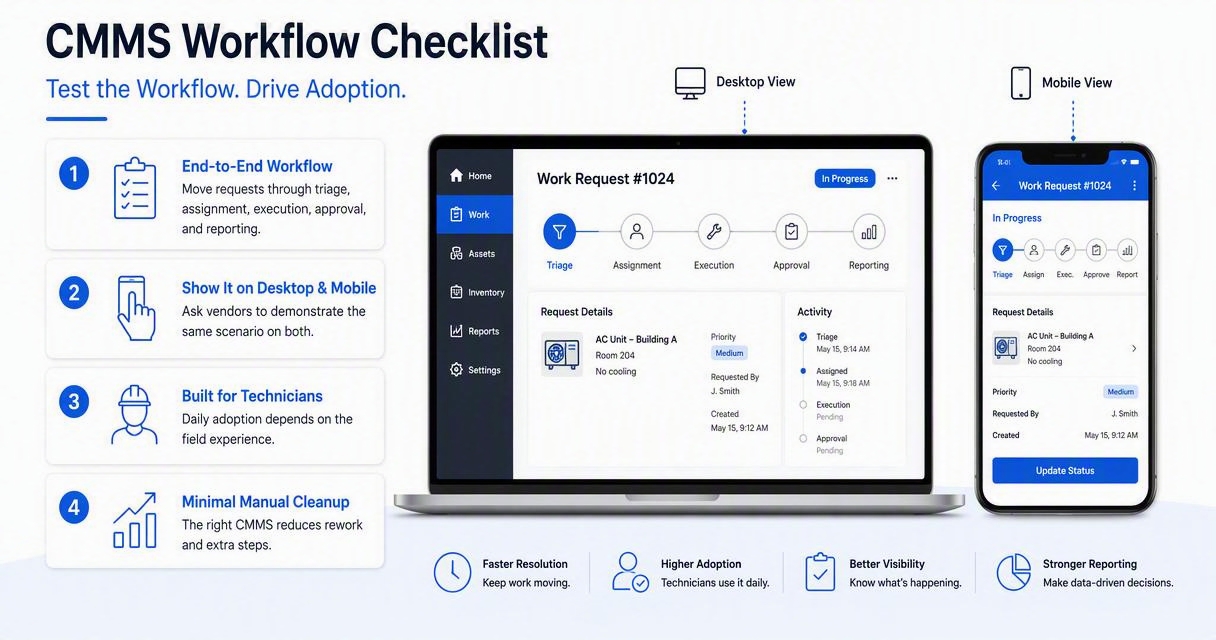
A useful scenario is simple: a rooftop unit fails at a multi-site property, a store manager submits the request, a coordinator assigns it, a technician adds parts and photos, and a manager reviews cost. The demo should show how asset history, location, priority, warranty, and vendor notes travel with the job.
For teams struggling with ticket volume, the practical question is how fast work moves without phone calls, spreadsheets, or duplicate entry. The workflow principles in how to simplify facility work orders fast can help shape demo scenarios before vendor meetings.
Side-by-side workflow scoring table
| Demo area | What to ask the vendor to show | Pass signal |
|---|---|---|
| Request intake | Create a tenant, employee, or store request | Request becomes a trackable work order with priority |
| Triage | Route by site, asset, issue type, or urgency | No manual retyping or spreadsheet export |
| Assignment | Dispatch to internal tech or outside vendor | Assignee gets clear scope, due date, and location |
| Mobile update | Add notes, photos, labor, and parts from the field | Updates appear instantly for managers |
| Asset history | Open past repairs from the work order | Repeat failures are easy to see |
| Preventive maintenance | Convert recurring work into scheduled tasks | Calendar and compliance views are clear |
| Closeout | Capture completion notes and approvals | Reports update without extra admin work |
Mobile, permissions, vendors, and integrations to test
Mobile access, user permissions, vendor workflows, and integrations should be tested in the demo because they decide whether the CMMS works outside the office. A platform that performs well for administrators but poorly for field users will usually create side channels, missed updates, and weak data.
Ask for role-based views for technicians, supervisors, property managers, requesters, executives, and vendors. Each role should see only the tasks, sites, costs, and approvals needed for the job. For multi-site teams, permissions should support regional managers, location-level users, and portfolio reporting without creating separate databases.
Connectivity also deserves a direct test. Photos, notes, and checklists should still be practical in mechanical rooms, basements, roofs, and remote sites where signal quality drops. The operational impact of weak access is covered in the hidden cost of poor connectivity in facilities management.
Leansite supports this evaluation style by keeping work order visibility, site context, and maintenance coordination close to the actual task flow. For brand and product details, facility teams can visit getleansite.com after building a demo scorecard.
Access and integration questions
-
Can technicians complete jobs from a phone without returning to a desktop?
-
Can vendors receive, update, and close assigned work without seeing private internal data?
-
Can requesters submit issues without becoming full CMMS users?
-
Can managers approve work, review photos, and see overdue tasks from mobile?
-
Can the CMMS connect with accounting, procurement, identity management, sensors, or building systems?
-
Can data export cleanly for reporting tools or portfolio dashboards?
-
Can permissions be copied across similar sites to reduce setup time?
Helpful video for inventory thinking
Inventory controls often expose whether a CMMS has practical structure or just attractive screens. Even when a team plans to replace spreadsheets, this kind of inventory model helps clarify part numbers, reorder points, locations, and ownership before a vendor imports data.
Reporting, implementation, support, and pricing questions
Reporting, implementation, support, and pricing questions should confirm the total operating fit, not just the subscription cost. A CMMS demo should show which metrics appear by default, which require configuration, and which require paid services or higher-tier plans.
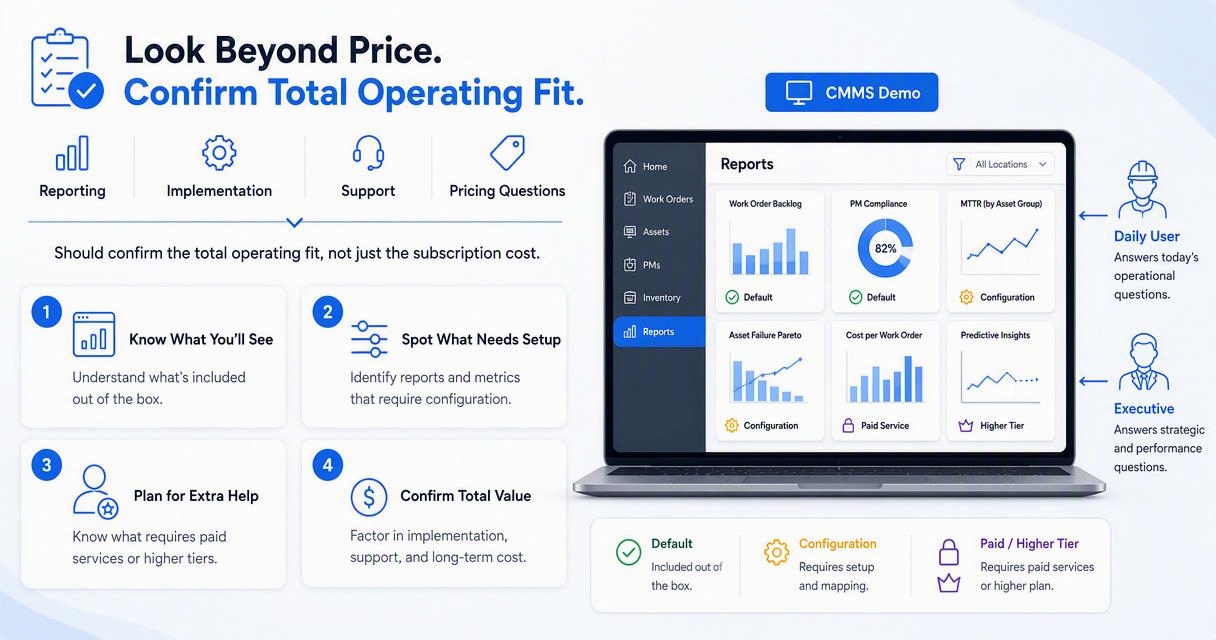
Reports should answer daily and executive questions. Daily users need open work, overdue PMs, technician workload, and vendor status. Leaders need cost by site, asset downtime, repeat failures, preventive completion, and trend views. Predictive maintenance planning also depends on cleaner data, as explained in maximizing facility uptime with predictive maintenance.
Pricing deserves plain language. Request a quote that separates users, locations, assets, integrations, implementation, data migration, training, support, storage, vendor access, and future add-ons. A low starting price can become expensive if essential workflows sit behind premium tiers.
Implementation should include a named timeline: kickoff, data cleanup, asset import, user setup, pilot sites, training, go-live, and post-launch review. The Leansite platform fits teams that want demo conversations tied to real rollout needs rather than abstract feature tours.
Pricing and rollout checklist
-
Confirm whether pricing is based on users, sites, assets, modules, or work order volume
-
Ask which features shown in the demo are included in the quoted plan
-
Request sample training materials for technicians and managers
-
Confirm support hours, response targets, and escalation paths
-
Ask how historical work orders, assets, parts, and vendor records are imported
-
Request a pilot plan for one site or one region before full rollout
-
Ask what success metrics the vendor reviews after 30, 60, and 90 days
How to compare vendors after the demo
Vendors should be compared with a weighted scorecard that reflects operational priorities, not personal preference after a slick presentation. Facility teams should score each platform immediately after the demo while the evidence is fresh.
A simple scoring model can weight core workflows, mobile adoption, reporting, integrations, implementation, vendor access, and pricing transparency. Multi-location operators may give more weight to role permissions and portfolio dashboards, while campus teams may care more about request intake, compliance tasks, and technician routing. Related comparisons, such as work order systems for multi-site facilities, can help calibrate expectations.
The 2026 buying environment is also shifting toward more connected maintenance data. CMMS platforms are increasingly expected to support predictive analytics, sensor-fed alerts, faster vendor collaboration, and executive cost visibility. That does not mean every buyer needs advanced automation on day one. It does mean the selected system should not trap facility data in a narrow ticket log.
Key takeaway: A strong demo ends with evidence: completed workflows, clear reporting, known costs, realistic implementation steps, and a confident adoption plan.
FAQ
How long should a CMMS demo take?
A useful CMMS demo usually takes 60 to 90 minutes when the vendor walks through real scenarios. Shorter demos can introduce the product, but they rarely cover mobile work, reporting, permissions, vendors, integrations, implementation, and pricing with enough detail for a buying decision.
Who should attend a CMMS demo?
A CMMS demo should include a facility manager, maintenance supervisor, technician representative, finance or procurement contact, IT stakeholder, and at least one requester or property operations user. Each person sees different risk, from field usability to data security and long-term cost.
What is the biggest mistake during a CMMS demo?
The biggest mistake is accepting a canned demo that never uses actual facility workflows. Buyers should bring sample assets, request types, PM schedules, vendor scenarios, and reporting needs so the vendor must prove practical fit instead of showing only polished features.
Should vendors be given the same demo script?
Every shortlisted vendor should receive the same demo script and scoring sheet. That keeps the comparison fair and makes gaps easier to spot. For broader platform comparisons, teams can review top work order platforms for multi-site facilities.
Conclusion
A CMMS demo checklist for facility managers should turn a sales meeting into an operational test. The strongest process starts with real work orders, asset examples, mobile tasks, permission roles, vendor steps, reporting needs, rollout milestones, and full pricing questions. After demos, the buying team should score each vendor the same day, request clarification on weak areas, and pilot the top choice with live users before a full rollout. For a practical maintenance coordination platform built around real facility workflows, schedule a closer look at Leansite or head to getleansite.com.
